AI agent architecture defines how an agent receives a goal, assembles context, decides what to do, calls tools, checks the result, and either continues, stops, or asks a person for help.
The large language model supplies language understanding and reasoning. The surrounding system supplies state, permissions, validation, execution, and control.
This guide explains AI agent architecture with key components, common design patterns, multi-agent orchestration options, production risks, and a step-by-step approach to choosing the right architecture for your use case.
A production design can be a bounded single-agent workflow or a wider agentic AI architecture with multiple specialists. The right choice depends on task variability, risk, latency, cost, and the need for separation between tools or data. This guide explains the components, control loop, patterns, production safeguards, and practical use cases behind a reliable system.
TL;DR
- AI agent architecture is the blueprint for how an agent reasons, plans, uses tools, remembers context, acts, and checks results.
- The main components of AI agent architecture are the model, instructions, memory and state, context, planner, tools, executor, guardrails, observability, and human oversight.
- The best AI agent architecture is the simplest one that reliably solves the workflow; not every task needs a multi-agent system.
- Use single-agent architecture for bounded domain tasks and multi-agent architecture only when specialization, parallel work, or security boundaries justify added complexity.
- Production agents need tool permissions, guardrails, evaluation, tracing, approval gates, and rollback paths before they take real actions.
Table of Contents
What is AI agent architecture?
AI agent architecture is the system design that lets an AI agent understand a goal, gather context info, plan steps, use tools, take actions, observe results, and then decide to stop or escalate within certain limits.
A large language model helps with the reasoning layer, but the LLM agent architecture determines whether the agent is useful, safe, and reliable in real-world use.
A practical AI agent architecture includes a model, instructions, task context, memory, retrieval, a planner or control loop, tool access, execution logic, safety measures, human approval points, and observability.
The design can be a simple single-agent workflow or a multi-agent system, depending on task complexity, risk, latency, and governance requirements.
The study of agent architecture in artificial intelligence (AI) predates language models.
- Traditional agents observe an environment and select actions under a set policy.
- Modern AI agents extend that idea with natural-language reasoning, flexible tool selection, and access to unstructured knowledge.
The main question in designing AI agent architecture remains the same: what information can the system use, what actions can it take, and how does it know that the goal is complete?
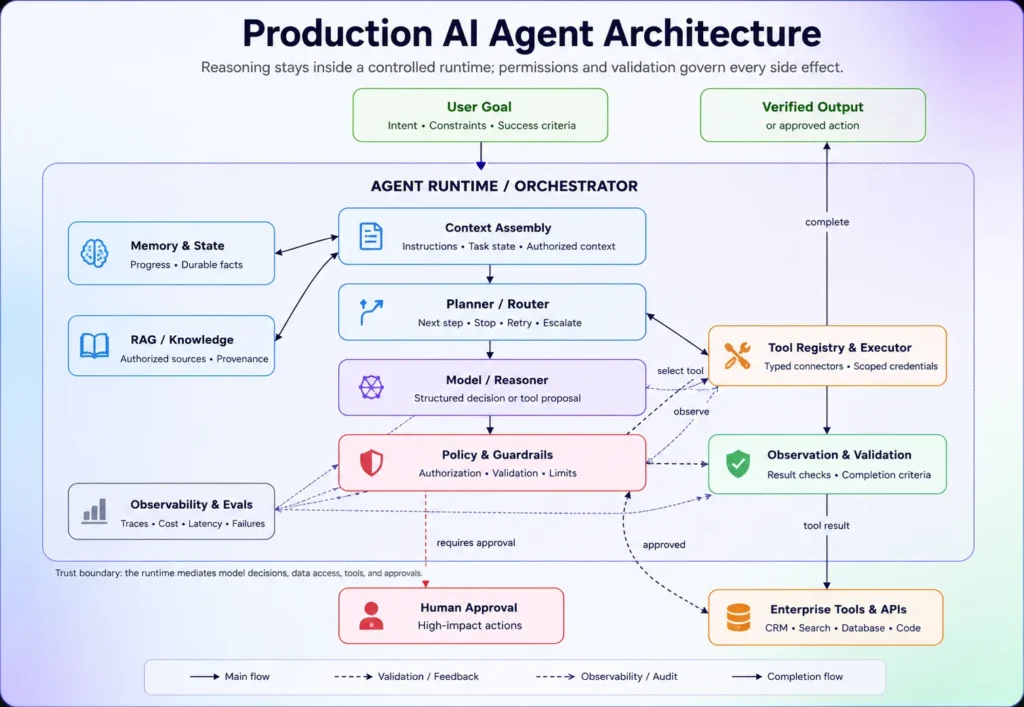
What does an AI agent architecture diagram look like?
A good AI agent architecture separates reasoning from execution. It starts with a goal and gathers an approved context. It then asks the model or planner for the next action, validates the proposed call, executes it through a controlled interface, records the result, and feeds the observation back into the loop.
The key part of the AI agent architecture diagram is the runtime or orchestrator, which manages the control flow. It receives suggestions from the model but decides whether that step is allowed, whether approval is required, and whether the result satisfies the completion condition.
Sometimes, an agentic AI architecture diagram includes routers, specialized agents, shared state, queues, and transfer protocols. These are only needed if one helper cannot handle the workload alone or if different helpers need special permissions, rules, models, or memory windows.
What are the core components of AI agent architecture?
The components of AI agent architecture include the reasoner, instructions, task context, planner, memory, retrieval, tool layer, executor, policy controls, approvals, and observability. Each of them has one clear responsibility and a defined failure path.
A production AI agents architecture should not let the model directly hold credentials or call unrestricted services. The runtime should mediate every side effect.
This separation also keeps the modern agent architecture in artificial intelligence auditable, as reviewers can see what the model proposed, what the tool returned, and why the workflow continued.
Here is the table that includes components of AI agent architecture and their role with production requirements:
| Component | Role | Production requirement |
|---|---|---|
| Model or reasoner | Interprets the goal and proposes decisions or actions. | Select for task quality, structured output, latency, cost, and deployment constraints. |
| Instructions and policies | Define scope, priorities, output format, prohibited actions, and completion rules. | Version instructions and test conflicting or ambiguous cases. |
| Task context | Supplies the current request, user identity, workflow state, and relevant environment data. | Keep trusted policy separate from untrusted user or retrieved content. |
| Planner and control logic | Select the next step, route work, enforce stop rules, and manage retries. | Add iteration, time, and cost limits. |
| State and memory | Preserve progress, prior actions, and durable user or domain knowledge where justified. | Apply retention limits, access control, correction, and deletion rules. |
| Retrieval layer | Finds authorized documents, records, or current facts. | Track source, freshness, permissions, and retrieval confidence. |
| Tool registry and executor | Expose approved APIs, databases, browsers, code runners, or enterprise applications. | Use typed schemas, allowlists, idempotency, and sandboxing. |
| Policy controls and approvals | Block prohibited actions and pause high-impact steps for human review. | Enforce policy outside the model and record approval evidence. |
| Observability and evaluation | Record model calls, tool calls, outcomes, cost, latency, failures, and policy events. | Make traces searchable and connect failures to regression tests. |
How does AI agent architecture work step by step?
AI agent architecture works through a controlled observe-decide-act loop. The workflow begins with a measurable goal and ends when the system proves completion, reaches a limit, or escalates the task.
- Receive the goal and constraints. The runtime captures the requested outcome, user identity, deadlines, budget, permissions, and actions that are out of scope.
- Assemble context. The system loads task state, approved documents, records, policies, and relevant history. It excludes context the user or agent is not authorized to access.
- Choose the next step. A fixed workflow, router, or model proposes an action. High-risk paths should use deterministic rules before model judgment.
- Select an approved tool. The runtime maps the proposed action to a typed tool and validates required parameters.
- Check policy and approval. The system verifies identity, authorization, risk tier, spend limits, and whether a person must approve the action.
- Execute the action. The tool layer performs the API call, query, code run, or enterprise-system update.
- Validate the result. The runtime checks the tool response, confirms side effects, detects partial failure, and compares progress with the success criteria.
- Reflect, retry, or route. The agent may revise the plan, retry within limits, use another tool, or route the task through AI agent routing.
- Update state and stop. The runtime records the result and either returns a verified output, continues the loop, or escalates with a clear reason.
How is AI agent architecture different from agentic AI architecture?
AI agent architecture focuses on the design and operation of a single AI agent, while agentic AI architecture involves multiple agents working together, along with organized processes, shared resources, rules, and human involvement.
The table below differentiates AI agent architecture and agentic AI architecture:
| Design | Primary unit | Best fit | Main control challenge |
|---|---|---|---|
| Single-agent system | One model-driven role with tools and state | Bounded work inside one domain | Tool scope, stop rules, and recovery |
| Agentic system | Agents plus workflows, services, governance, and people | End-to-end business processes | Ownership, approvals, and policy consistency |
| Multi-agent architecture | Several specialized agents coordinated through routing or orchestration | Parallel or cross-domain work | Handoffs, shared state, duplication, and conflict |
| Deterministic automation | Code or rules that follow known paths | Stable, repeatable processes | Handling exceptions without adding unnecessary model behavior |
What are the main AI agent architecture patterns?
Design frameworks for AI agents vary from single model responses to advanced networks of specialized models. To maintain efficiency, implement the least complex framework capable of fulfilling system requirements. Both Anthropic and Microsoft recommend avoiding unnecessary coordination unless the workload needs it.
The common AI agent architecture patterns include:
Direct model call
Use a direct model call for classification, extraction, text transformation, or basic question answering without external triggers. While this configuration lacks full autonomous agent architecture, it establishes a reliable baseline. Add retrieval when specialized or real-time context is missing, and transition to a true agent model only when the system must dynamically determine its own operational phases.
Workflow-based agent
A workflow-based agent follows an explicit procedural graph with embedding model decisions at selected nodes. It works well for support triage, document processing, and approval flows because critical transitions remain deterministic. Additionally, explicit graphs simplify the execution of custom retries, processing timeouts, and state rollbacks during testing stages.
Single agent with tools
A single tool-using agent receives one domain goal and selects among a small set of approved functions. It suits tasks such as checking an order, updating a ticket, or preparing a report. Keep the tool set narrow. Large, overlapping tool catalogs increase selection errors and make permissions harder to review.
ReAct (Reason-Action) agents
ReAct agents step through repeating cycles of evaluation, action execution, and contextual observation. They fit for open-ended research or diagnostic troubleshooting workloads where future tasks depend on preceding discoveries. Production deployments require strict step caps and verifiable criteria before concluding a task.
Planner-executor agent
The planner-executor pattern separates the initial task breakdown from the actual step execution. A dedicated planning module drafts and amends the execution strategy, whereas an executor runs individual operations utilizing regulated toolkits. This design mitigates hurdles in extended operations, though it risks stale planning maps. Systems should trigger dynamic planning adjustments based on key outcomes rather than executing an unverified plan sequentially.
Retrieval-Augmented Generation (RAG) agents
A RAG agent combines retrieval with action. A typical cycle involves breaking down an inquiry, looking up information across diverse data layers, validating the cross-references, and outputting structured text with corresponding citations. Securing information boundaries inside the retrieval engine takes priority over expanding model layers. Maintain a strict division between injected source text and base operational instructions to prevent content from overriding core system rules.
Reflection or evaluator pattern
A reflection loop asks the system to review an output and revise it. An evaluator-optimizer loop uses a separate evaluator, rule set, or test harness to score the result before another attempt. Use this pattern when quality can be checked objectively, such as code tests, schema validation, or citation coverage. Avoid open-ended self-review with no stopping threshold.
Coordinating several agents
Agent orchestration aligns multiple specialized agents using structured pipelines, parallel execution paths, specialized routing rules, or hierarchical supervisor-worker architectures. Use it when specialists need materially different tools, context, models, or security policies.
What is multi-agent architecture?
A multi-agent system uses specialized agents that coordinate through a router, orchestrator, handoff, shared workspace, or group protocol. It should solve a decomposition problem that one agent cannot handle reliably, not merely divide one prompt across more models.
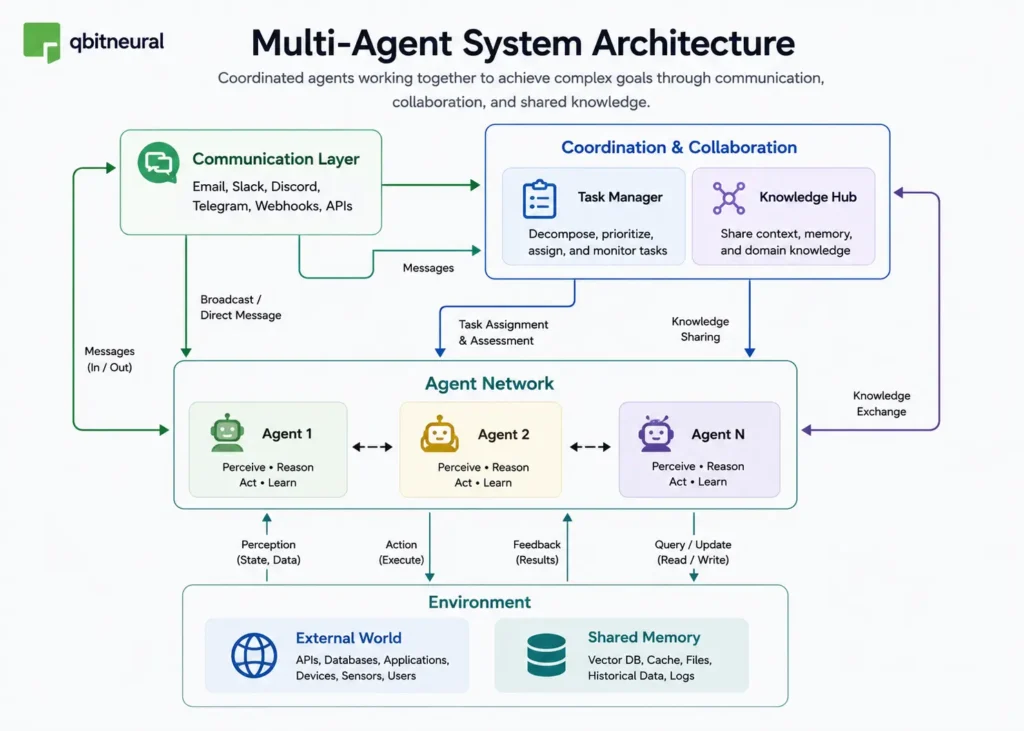
Common orchestration patterns include:
- Sequential: One agent completes a step and passes a structured result to the next.
- Concurrent: Several agents work independently, and an aggregator combines their outputs.
- Handoff: The active agent transfers control to a specialist with different instructions or tools.
- Manager-worker: A manager decomposes the task, assigns work, checks progress, and produces the final response.
- Maker-checker: One agent creates an output, and another verifies it against evidence or policy.
- Group conversation: Agents contribute under shared rules until a stop condition is met.
How do you design a production-ready AI agent architecture?
Prior to allowing an agent to interact with a live system, a production-grade architecture must clearly establish task boundaries, operational data sources, tool permissions, and state management guidelines. Additionally, it should include robust validation metrics, human approval thresholds, tracing protocols, and failure recovery paths.
This architectural design demands continuous iteration and evolves dynamically when system traces reveal recurring routing errors, excessive execution loops, poor data retrieval, or severe approval friction. Also, an enterprise agentic framework needs to clearly outline platform identity controls, shared operational services, policy stewardship, and structured incident handling procedures.
- Define one measurable outcome. State what success means, what the agent must not do, and who owns the risk.
- Decide whether an agent is needed. Keep stable rules in deterministic code. Use model decisions only where variation requires them.
- Map context and trust levels. Label system policy, user input, retrieved content, tool output, and memory by source and authority.
- Choose the simplest pattern. Start with one agent or workflow. Expand only after evaluation shows a real limitation.
- Restrict tools and credentials. Apply least-privilege tool access, typed parameters, allowlists, timeouts, rate limits, and idempotency keys.
- Add policy checks around actions. Use guardrails before and after model calls and tools. High-impact actions should pause for a human-in-the-loop decision.
- Design state deliberately. Separate temporary task state from long-term memory. Define retention, correction, deletion, tenancy, and access rules.
- Trace the full workflow. Record model versions, prompt versions, retrieved sources, tool arguments, tool outputs, approvals, latency, and cost.
- Evaluate realistic failure cases. Test missing data, malicious documents, unavailable tools, conflicting instructions, partial side effects, and requests that should be refused.
- Deploy in stages. Begin with offline evaluation, then recommendation or shadow mode, then low-risk reversible actions, and only later broader autonomy.
What are common AI agent architecture examples?
The AI agent architecture examples describe the full path from goal to verified result. Below are some common examples:
Customer support agent
A support agent receives a customer request, authenticates the user, retrieves account and policy data, selects an allowed resolution, updates the service system, and confirms the result. Its design should keep identity checks and refund limits outside the model. A person handles policy exceptions, disputes, or low-confidence matches.
Research and RAG agent
A research agent decomposes a question, searches approved sources, extracts evidence, compares claims, and generates a cited report. Its agent architecture in artificial intelligence should track provenance at the passage level and reject unsupported conclusions. A reviewer may approve reports used for legal, financial, or strategic decisions.
Coding agent
A coding agent reads a repository, plans a bounded change, edits files in a sandbox, runs tests, inspects failures, and prepares a patch. The system should restrict repository scope, block secret access, cap command execution, and require review before merge or deployment.
Sales qualification agent
A sales agent reads an inbound request, enriches approved company data, evaluates qualification rules, updates the CRM, and routes the lead. It should not invent firmographic facts or contact people outside consent and communication policies.
Procurement assistant
A procurement agent gathers requirements, searches approved suppliers, compares price and policy constraints, prepares a recommendation, and creates a draft request. A buyer approves vendor selection, contractual terms, and purchase commitments.
Cybersecurity triage agent
A security agent collects alert context, queries threat intelligence and asset systems, summarizes evidence, assigns a severity recommendation, and suggests or runs preapproved containment. The agent architecture must separate read-only investigation from disruptive actions, such as device isolation or account disabling.
What are the risks in an agent system?
The main risks appear when probabilistic model outputs can affect external systems. An agent may misunderstand a goal, trust malicious content, select the wrong tool, repeat an action, expose sensitive data, or consume resources without a valid stopping point. Risks include:
- Prompt injection: Malicious instructions can enter through user prompts, emails, documents, web pages, or tool responses. Isolate untrusted content, maintain instruction priority, validate tool calls, and restrict permissions.
- Excessive agency: Broad tool access, powerful credentials, or weak approval controls can let an agent take unsafe actions. Use narrow permissions, action risk levels, approval gates, and reversible operations.
- Hallucinated actions: The model may choose an unsupported action or generate invalid tool parameters. Require structured outputs, schema validation, precondition checks, and dry-run testing before execution.
- Memory poisoning: Incorrect or malicious information can enter long-term memory and influence future decisions. Add source labels, tenant isolation, validation before memory writes, expiration rules, and correction workflows.
- Runaway loops: A planner may repeat steps, retry failed tasks, or trigger endless agent handoffs. Set strict limits for steps, execution time, tokens, retries, and total cost.
- Duplicate side effects: Retries after partial execution can create duplicate payments, messages, records, or transactions. Use idempotency keys, verify transaction status, and define compensating actions.
- Hidden failures: Weak logging can hide incorrect decisions, failed actions, or degraded performance. Capture end-to-end traces, maintain replayable test cases, configure alerts, and review incidents regularly.
How do you build a simple agent architecture?
Build the smallest system that can complete one measurable task. Start with a model, explicit instructions, one or two safe tools, a runtime loop, validation, traces, and a stop condition. Add retrieval only when the task needs external knowledge. Add memory only when past state improves the outcome.
Frameworks such as LangGraph, CrewAI, the OpenAI Agents SDK, Semantic Kernel, and cloud agent platforms can provide runtime features. A custom Python workflow may be better for narrow tasks. Choose based on control, portability, tracing, deployment, and team skills rather than the size of the framework’s feature list.
To give you a taste of how an AI agent architecture works in practice, we will build a product-cost assistant using LangGraph and Groq.
The agent can:
- Look up product prices.
- Perform calculations.
- Decide when to call a tool.
- inspect tool results.
- Continue reasoning until it reaches a final answer.
- Stop when it reaches a fixed execution limit.
We will implement AI agent architecture in two ways:
- A prebuilt ReAct agent for quick development.
- A custom StateGraph for greater control over state, routing, tool execution, and guardrails.
Run the following script to install LangGraph, LangChain, and the Groq integration. You can run the complete example in Google Colab without configuring a local Python environment.
!pip install -qU langgraph langchain-groq langchainWe use Groq to access a large language model, which supports structured tool calling. Get an API key from the Groq console and enter it securely when the notebook asks for it.
import os
from getpass import getpass

if not os.environ.get("GROQ_API_KEY"):
    os.environ["GROQ_API_KEY"] = getpass("Enter your Groq API key: ")

from langchain_groq import ChatGroq

llm = ChatGroq(
    model="llama-3.3-70b-versatile",
    temperature=0,
)Setting temperature=0 makes the model more consistent when it selects tools and generates structured arguments.
Next, we will define the agent tools and use LangChain’s @tool decorator to convert each Python function into a structured tool that the language model can call. The agent has access to two tools:
- A calculator for basic arithmetic.
- A product catalog for retrieving item prices.
import json
from langchain_core.tools import tool


# ── Tool 1: safe calculator ─────────────────────────────────────────
@tool
def calculator(expression: str) -> str:
    """Evaluate a basic math expression and return the numeric result.

    Args:
        expression: Math expression, e.g. '2 * 3 + 1'
    """
    allowed = set("0123456789+-*/.() ")
    if not all(ch in allowed for ch in expression):        # ← guardrail
        return "ERROR: only basic math characters are allowed"
    try:
        return str(round(eval(expression), 6))
    except Exception as e:
        return f"ERROR: {e}"


# ── Tool 2: product price lookup ────────────────────────────────────
@tool
def lookup_price(item: str) -> str:
    """Look up the price of a product by name.

    Args:
        item: Product name, e.g. 'Widget A'
    """
    catalog = {"widget a": 29.99, "widget b": 49.99, "widget c": 19.99}
    price = catalog.get(item.lower())
    if price:
        return json.dumps({"item": item, "price": price})
    return f"'{item}' not found in catalog"


tools = [calculator, lookup_price]The calculator includes an input guardrail that rejects unsupported characters. The price tool returns structured JSON so the model can identify the product, price, currency, and lookup status.
For a production system, use a dedicated expression parser instead of eval, even with restricted input.
Approach A: Build a prebuilt ReAct agent
The fastest way to create the agent is to use LangGraph’s prebuilt ReAct implementation.
A ReAct agent follows a repeated cycle:
- Reason about the request.
- Select an action.
- Call a tool.
- Observe the result.
- Decide whether another action is required.
The framework manages this control loop automatically.
from langgraph.prebuilt import create_react_agent

# Build the agent in one line
react_agent = create_react_agent(llm, tools)

# Run it
result = react_agent.invoke(
    {"messages": [("human", "What is the price of Widget A? Multiply it by 3.")]},
    config={"recursion_limit": 20},   # guardrail: prevent runaway loops
)

# Pretty-print every message in the conversation
for msg in result["messages"]:
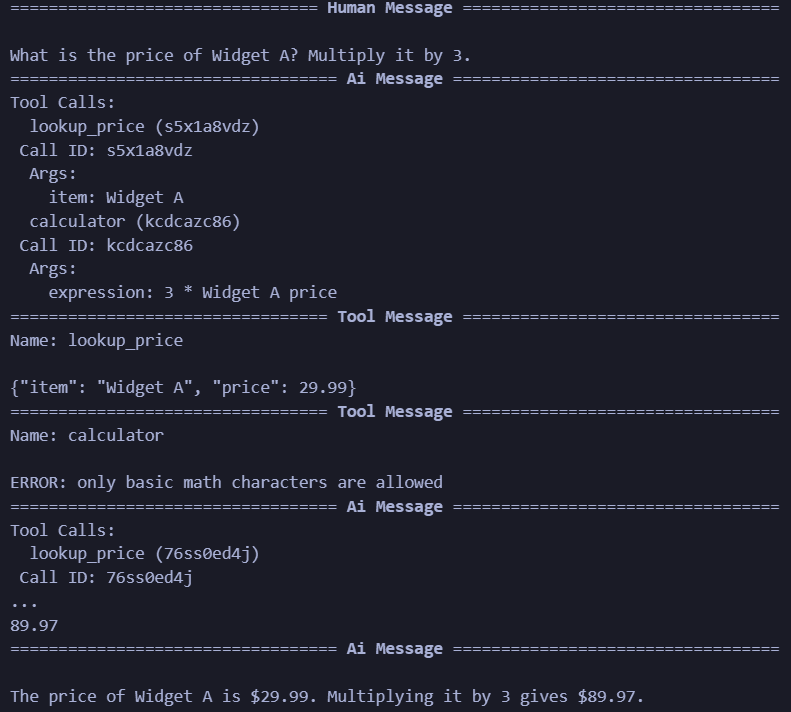
msg.pretty_print()The agent should first call lookup_price to retrieve the price of Widget A. It then calls the calculator to multiply that price by three before returning the result.
The recursion_limit acts as a safety control. It prevents the agent from continuing indefinitely when the model repeatedly calls tools without completing the task.
Output:
Approach B: Build a custom StateGraph
A custom StateGraph gives you direct control over the complete AI agent architecture.
LangGraph passes a shared state object between nodes. The state stores the conversation history and the number of model calls made during the current run.
import operator
from typing import Annotated
from typing_extensions import TypedDict
from langchain_core.messages import AnyMessage


class AgentState(TypedDict):
    messages: Annotated[list[AnyMessage], operator.add]   # append-only message log
llm_calls: int # budget counterThe messages field contains the user request, model responses, tool calls, and tool observations.
The operator.add reducer tells LangGraph to append new messages instead of replacing the existing conversation history.
The llm_calls field works as an execution counter. We will use it to stop the graph when it reaches its allowed model-call budget.
Next, we will create a model node that acts as the reasoner in the AI agent architecture. It reads the current state and decides whether to call a tool or return a final answer.
from langchain_core.messages import SystemMessage

# Bind tools to the model so it can emit structured tool_calls
model_with_tools = llm.bind_tools(tools)

SYSTEM_PROMPT = (
    "You are a helpful assistant. "
    "Use the provided tools when you need to calculate or look up data. "
    "Always show your reasoning before giving a final answer."
)


def model_node(state: AgentState):
    """Ask the LLM to decide the next action or produce a final answer."""
    response = model_with_tools.invoke(
        [SystemMessage(content=SYSTEM_PROMPT)] + state["messages"]
    )
    return {
        "messages": [response],
        "llm_calls": state.get("llm_calls", 0) + 1,
}The bind_tools() method gives the model the schemas for the calculator and price lookup functions. The model can then generate a structured tool call containing the selected tool name and its arguments.
The node also increments llm_calls after every model invocation. This provides basic observability and supports the execution-budget guardrail.
Next we will create the tool executor node that will executes each tool call produced by the model and returns the result as a ToolMessage.
from langchain_core.messages import ToolMessage

tools_by_name = {t.name: t for t in tools}


def tool_node(state: AgentState):
    """Execute approved tool calls and return observations."""
    results = []
    for tc in state["messages"][-1].tool_calls:
        if tc["name"] not in tools_by_name:                          # ← policy check
            observation = f"ERROR: tool '{tc['name']}' is not registered"
        else:
            observation = tools_by_name[tc["name"]].invoke(tc["args"])
        results.append(ToolMessage(content=str(observation), tool_call_id=tc["id"]))
return {"messages": results}The tools_by_name dictionary acts as an allowlist. The executor rejects any tool that has not been explicitly registered.
Now we are defining a routing logic that determines whether the graph should execute a tool or stop. It enforces two rules:
- Stop when the model returns a final response without tool calls.
- Stop when the model-call budget has been exhausted.
from typing import Literal
from langgraph.graph import END

MAX_LLM_CALLS = 6   # hard guardrail: prevent runaway loops


def should_continue(state: AgentState) -> Literal["tool_node", "__end__"]:
    """Route to tool_node if there are tool calls, otherwise end."""
    # Guardrail: budget exceeded
    if state.get("llm_calls", 0) >= MAX_LLM_CALLS:
        print(f"⚠️  Guardrail triggered: reached {MAX_LLM_CALLS} LLM calls — stopping.")
        return END

    last = state["messages"][-1]
    if hasattr(last, "tool_calls") and last.tool_calls:
        return "tool_node"

return ENDWhen the latest model response includes tool calls, the graph moves to tool_node. When no tool call exists, the graph treats the response as complete and ends the run.
This code block below connects the reasoner, executor, routing function, and loop into one executable graph.
from langgraph.graph import StateGraph, START, END

# Build the graph
builder = StateGraph(AgentState)

builder.add_node("model_node", model_node)     # the reasoner
builder.add_node("tool_node", tool_node)        # the executor

builder.add_edge(START, "model_node")           # entry point
builder.add_conditional_edges(                   # decide: act or stop
    "model_node",
    should_continue,
    ["tool_node", END],
)
builder.add_edge("tool_node", "model_node")    # observation → next reasoning step

agent = builder.compile()
The graph starts at model_node. The model either produces a final answer or requests one or more tools.
When it requests a tool, the graph moves to tool_node. The executor returns the observation to the state, and the graph sends that updated state back to the model.
You can visualize the compiled graph with this code:
from IPython.display import Image, display
display(Image(agent.get_graph(xray=True).draw_mermaid_png()))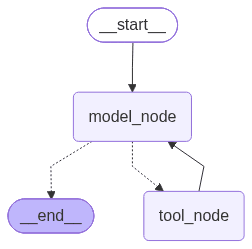
We can now test the architecture with a request that requires several tool calls.
from langchain_core.messages import HumanMessage

result = agent.invoke({
    "messages": [
        HumanMessage(
            content=(
                "I want to buy 3 units of Widget A and 2 units of Widget C. "
                "Look up each price, then calculate the total cost."
            )
        )
    ]
})

# Pretty-print every message
print("\n" + "=" * 60)
print("  FULL CONVERSATION TRACE")
print("=" * 60)
for msg in result["messages"]:
    msg.pretty_print()

print(f"\n📊 Total LLM calls: {result['llm_calls']}")Output:
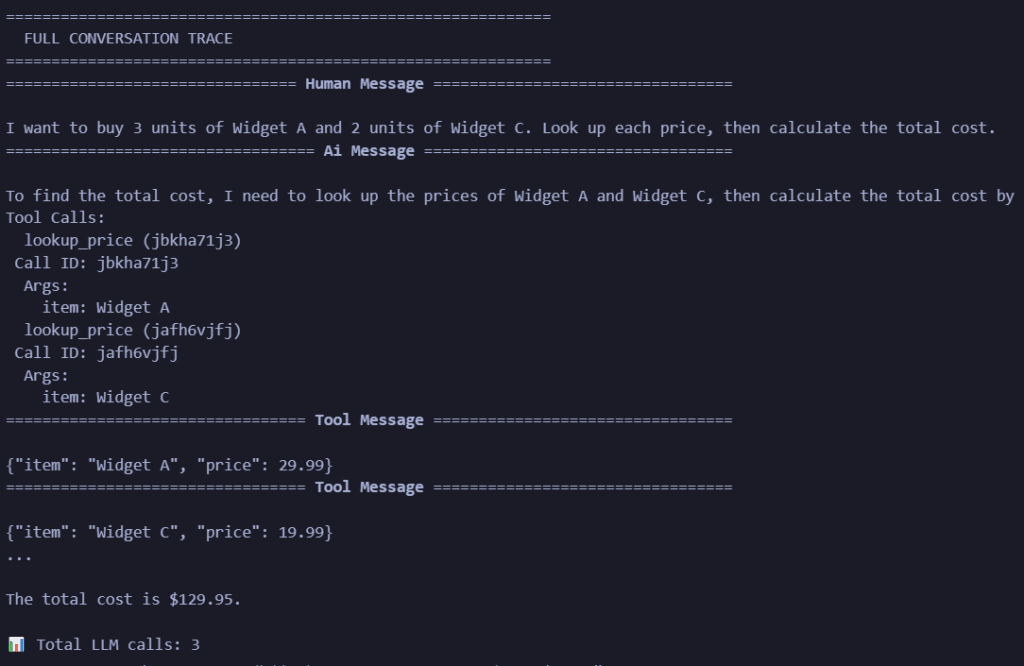
Conclusion: What is the safest way to approach AI agent architecture?
The safest approach is to start with one narrow workflow, use the simplest pattern that passes realistic tests, and grant only the context and tools required for that task. Keep policy enforcement outside the model. Trace every action. Require approval before high-impact side effects. Expand autonomy only when evaluation data supports it.
A good agent architecture in artificial intelligence makes the system useful, controllable, and measurable. A wider agentic AI architecture should add specialists only when they create clear value. Before publishing or deploying, review the final agentic AI architecture diagram to confirm that it shows permissions, validation, observability, human control, and rollback paths, not only model components.
Frequently asked questions
What is AI agent architecture?
It is the system design that connects a model to context, planning, state, tools, policy controls, execution, evaluation, and human oversight. It defines how the agent moves from a goal to a verified result.
What does AI agents architecture mean?
The phrase usually refers to the shared design of one or more agents: their models, runtimes, memory, tools, orchestration, permissions, and observability. In formal writing, “AI agent architecture” is the clearer singular term.
What is the difference between AI agent architecture and agentic AI architecture?
The first usually focuses on one agent and its runtime. The second covers the larger operating system of agents, deterministic workflows, shared infrastructure, governance, and people.
How does agent architecture in artificial intelligence relate to classical agents?
Both define how a system observes an environment, chooses actions, and pursues goals. Modern LLM agents add natural-language reasoning, retrieval, tool use, and flexible planning, but they still need an explicit policy, state model, action boundary, and completion test.
What is the difference between single-agent and multi-agent systems?
A single agent owns the task and uses its own tools and state. A multi-agent system divides work among specialists and needs routing, handoff rules, shared-state controls, conflict resolution, and a clear owner for the final output.
How does memory work in an agent system?
Short-term state tracks the current workflow. Long-term memory stores durable facts or preferences. Store only what improves the task, apply access and retention rules, label sources, and provide correction and deletion paths.
When should you not use an agent?
Do not use an agent when deterministic code already solves the process, when the goal cannot be verified, when errors are irreversible, or when the system cannot receive the permissions and oversight needed to act safely.