Agentic workflows combine AI-driven decisions with tools, state, validation, and fixed controls to complete multistep goals. Unlike a simple prompt chain, the execution path can change after each result. The system can select a tool, inspect its output, revise the plan, stop, or request human review.
A production agentic workflow should not give a model unlimited control. It should use model judgment only where rules cannot predict every case. Code and policy should still control permissions, data access, validation, budgets, and external side effects.
This guide will explain how agentic AI workflows operate, the main patterns and components, when to use them, practical agentic workflow examples, and how to build one safely.
TL;DR
- Agentic workflows let one or more agents choose the next step, use approved tools, inspect results, and continue until the goal, stop condition, or escalation point is reached.
- An agentic workflow differs from fixed automation because the route can change based on context and intermediate outcomes.
- The main designs include sequential chains, routing, parallel execution, orchestrator-worker systems, evaluator-optimizer loops, tool-use loops, and multi-agent handoffs.
- Use agentic workflow automation for variable tasks with unstructured inputs, several tools, frequent exceptions, and verifiable outcomes. Use deterministic automation for stable rules.
- A production AI agent workflow needs narrow permissions, explicit state, validators, approval gates, traces, evaluations, budgets, and rollback paths.
Table of Contents
What are agentic workflows?
Agentic workflows are processes in which one or more autonomous AI agents can decide what to do next, use approved tools, evaluate results, and adapt the execution path toward a defined goal. They combine flexible model decisions with deterministic controls for permissions, state transitions, validation, stopping conditions, and human escalation.

What makes a workflow agentic?
A workflow becomes agentic when it does more than send an input through a fixed model call. It has several operational properties:
- Goal-directed execution: The system works toward an end state.
- Dynamic control: The model can select or revise steps based on new information.
- Tool calling: The agent can query a database, search approved sources, run code, update a system, or hand work to another component.
- Persistent context: The runtime carries workflow state across steps and may use agent memory when past information is relevant.
- Feedback: A validator, evaluator, or reflection loop checks whether the latest action moved the task toward completion.
- Bounded autonomy: Guardrails and permissions restrict what data and actions the system can access.
- Explicit completion: The system stops, retries, falls back, or escalates under defined conditions.
How does an agentic workflow work?
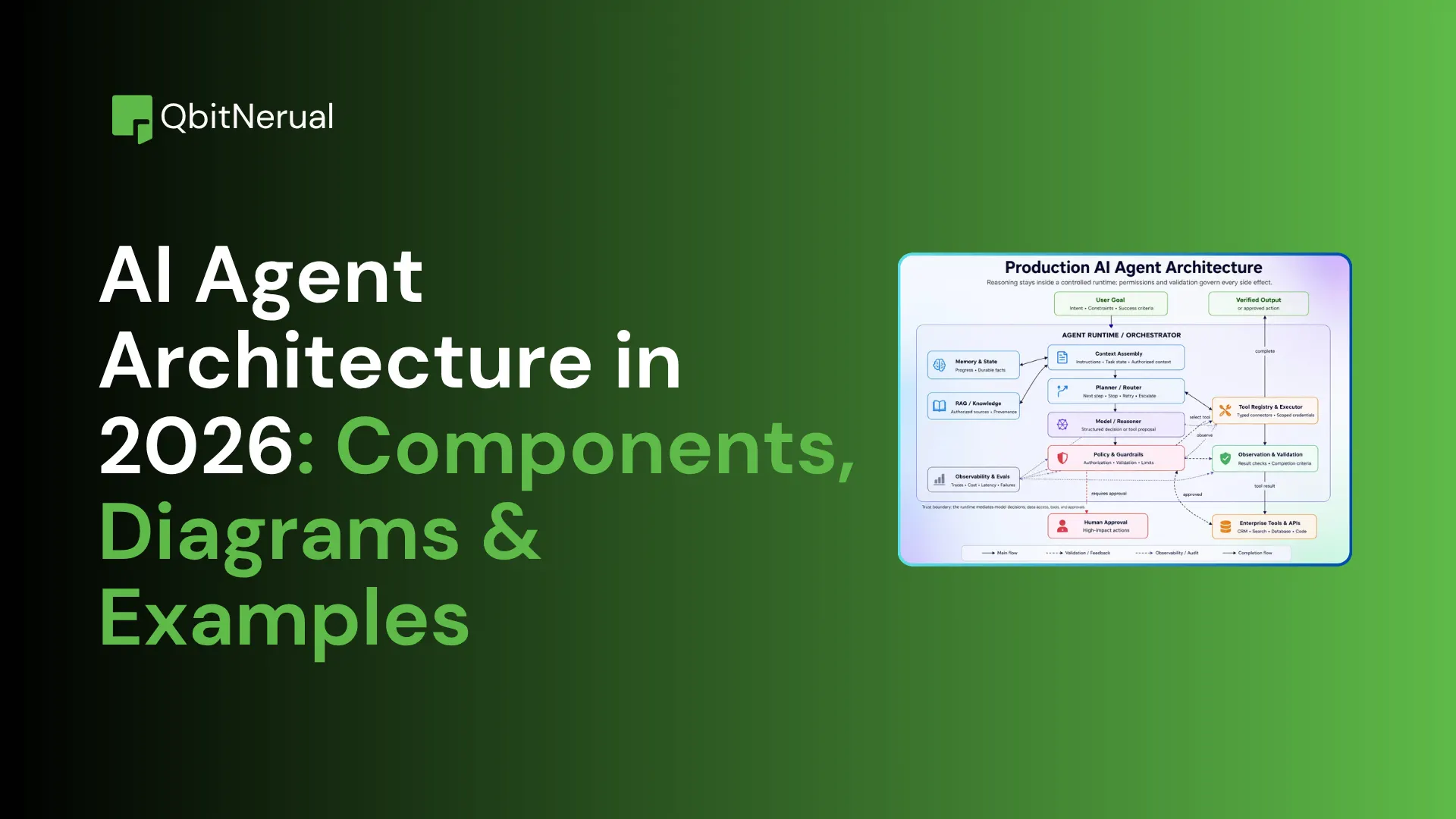
Agentic workflows run as a controlled loop: receive a goal, assemble context, plan or route the next step, propose a tool action, validate it, execute it, inspect the result, and then continue, stop, or escalate. The exact path can change, but the system still operates inside explicit technical and policy limits.
Consider an IT support request: “My laptop cannot connect to the company VPN.” A fixed chatbot may return a standard checklist. Agentic workflows can ask clarifying questions, inspect device and account context, call approved diagnostic tools, test a proposed fix, and escalate with a complete trace when it cannot resolve the problem.
1. Trigger and goal
A request, event, schedule, or system signal starts the workflow. The runtime converts it into a measurable goal, such as “restore VPN access without changing device security policy.” It also defines scope, constraints, and stop conditions.
2. Context assembly
The runtime retrieves only the information allowed for the task: user identity, device state, recent incidents, relevant policies, and available tools. Agentic workflows record these inputs in the current state so every later decision uses the same verified context.
3. Planning or routing
The agent applies planning and reasoning to choose the next action. It may use task decomposition to split the goal into smaller checks, or route the request to a specialist diagnostic path.
4. Tool proposal
The agent proposes a narrow action, such as checking VPN service status, reading device logs, or testing account permissions. Good tools have clear names, typed inputs, scoped outputs, and actionable errors. Anthropic’s tool-design guidance recommends building a small set of distinct, high-value tools rather than exposing every raw API endpoint.
5. Validation and execution
Deterministic code checks the tool name, input schema, authorization, policy, preconditions, and approval requirements. Only then does the action run. This separation prevents the model from directly controlling credentials or bypassing business rules.
6. Observation and evaluation
The runtime records the result and tests it against success criteria. If the diagnostic shows an expired certificate, the system can choose the approved renewal path. If the result is incomplete, it can gather more evidence instead of claiming success.
7. Continue, stop, remember, or escalate
The AI agent workflow repeats only while it is making progress and remains within its step, time, token, and cost budgets. It completes when the target state is verified, stores a useful trace, or hands the case to a person with the evidence and attempted actions attached.
How are agentic workflows different from AI workflows and traditional automation?
Traditional automation follows predefined rules. An AI workflow places one or more model calls inside a predefined path. Agentic workflows let an agent make bounded decisions about the next step based on context, tool results, and success criteria. The added flexibility helps with exceptions, but it also increases cost, latency, testing needs, and operational risk.
| Dimension | Traditional automation | AI-assisted workflow | Agent-directed workflow |
|---|---|---|---|
| Control path | Fixed | Mostly fixed | Dynamic within constraints |
| Decision-maker | Rules and code | Rules plus model outputs | Agent plus deterministic controls |
| Adaptation | Limited to coded branches | Adapts content, not route | Can revise route and tool use |
| State | Process variables | Process variables and model context | Explicit task state, checkpoints, and traces |
| Tools | Preselected | Usually preselected | Selected from an approved set |
| Human role | Handles exceptions | Reviews model outputs | Approves high-risk actions and unresolved cases |
| Best fit | Predictable processes | Classification, extraction, and drafting | Variable, multistep, tool-dependent tasks |
| Primary risk | Brittle rules | Poor model output | Wrong action or uncontrolled loop |
How is the agentic workflow different from an AI agent?
An AI agent is a software component that can interpret a goal and direct parts of its own process. An agentic workflow is the larger operational sequence that connects the agent to triggers, tools, data, validators, checkpoints, and people.
How is the agentic workflow different from agentic architecture?
The workflow describes what happens over time. Agentic workflow architecture describes the technical system that enables those steps: runtimes, models, tools, state stores, memory, policy engines, evaluators, and telemetry.
Agentic workflow automation vs. agentic process automation
Agentic workflow automation focuses on a bounded task flow, such as resolving a support case or processing an invoice exception. Agentic process automation applies similar agent-driven decisions across a larger business process that may span teams, systems, policies, and long-running states. Both should preserve deterministic controls around irreversible actions.
What are the core components of agentic workflows?
Production agentic AI workflows require a clear goal, explicit state, narrow integrations, an orchestration layer, validators, approval points, and observability. Each component should have one defined responsibility and a testable contract.
- Goal, scope, and stopping conditions: Define the desired end state, excluded actions, success checks, retry limits, and escalation rules.
- Model or agent: Interprets context and proposes plans, routes, tool calls, or revisions. Choose the smallest capable model that meets quality and latency targets.
- Context and state: The current task record should hold inputs, intermediate outputs, source references, permissions, status, budgets, and checkpoints.
- Tools and integrations: Expose only task-relevant actions through typed schemas. Keep read and write capabilities separate where possible.
- Agent orchestration: The runtime controls transitions, concurrency, retries, checkpoints, and deterministic branches. It should not depend on a model to enforce system invariants.
- Memory: Store only information that improves future decisions. Add provenance, tenancy boundaries, expiration, and correction paths.
- Validators and evaluators: Check schemas, facts, policies, preconditions, and outcome quality before and after actions.
- Human-in-the-loop: Require review for sensitive, ambiguous, expensive, or irreversible actions. Human review should be a designed state, not an emergency fallback.
- Workflow observability: Capture prompts, model decisions, tool calls, tool outputs, state changes, latency, cost, errors, approvals, and final outcomes.
What are the main agentic workflow patterns?
The agentic workflow patterns are sequential chains, routing, parallel execution, orchestrator-worker systems, evaluator-optimizer loops, tool-use loops, and multi-agent handoffs. Select the simplest pattern that matches task variability, verification needs, latency, cost, and security boundaries.
Sequential or prompt-chaining workflow
A sequential design sends the output of one step into the next. Use it when stages are known in advance, such as extract → validate → summarize → format. It is easy to test and trace, but it fails when the correct route depends on unexpected results.
- Example: A contract-review flow extracts clauses, compares them with policy, highlights deviations, and drafts a review summary. The stages stay fixed even though models handle individual transformations.
Routing workflow
A router classifies the request and sends it to a specialized model, toolset, agent, or deterministic subflow. It works well for mixed intents, multiple products, language-specific handling, or risk-based paths.
- Example: A support router sends billing issues to account tools, security incidents to a locked-down response flow, and general questions to retrieval.
Parallel workflow
Parallel execution runs independent subtasks or evaluators in parallel. It reduces latency and improves coverage when tasks do not depend on each other. The main challenge is aggregating conflicting or incomplete results.
- Example: A research assistant searches official documentation, release notes, and standards sources in parallel, then deduplicates findings before drafting.
Orchestrator-worker workflow
An orchestrator creates subtasks, delegates them to workers, and combines their outputs. Use it when the number or type of subtasks cannot be known in advance.
- Example: A code-maintenance planner inspects an issue, assigns repository search, test analysis, implementation, and documentation tasks, then assembles a reviewable change set.
Evaluator-optimizer workflow
A generator produces an output, and an evaluator scores it against explicit criteria. The system revises the output until it passes or reaches a limit. This pattern works when quality is measurable but first-pass success is unlikely.
- Example: A report writer drafts a technical brief. An evaluator checks required claims, sources, structure, and unsupported statements. The writer revises only the failed areas.
ReAct or tool-use loop
A tool-use loop alternates between deciding, acting, observing, and revising. Use it for uncertain tasks where the right tool or next question depends on the latest result. This pattern needs strict no-progress detection and action budgets.
- Example: A diagnostic agent checks logs, tests one hypothesis, observes the result, and selects the next approved check until the fault is verified or the case escalates.
Multi-agent handoff workflow
A multi-agent workflow transfers control among specialized agents based on domain, stage, or state. Use it only when specialization, parallelism, context isolation, or separate permissions justify the coordination overhead.
- Example: An invoice flow uses one agent for extraction, one for purchase-order verification, and one for exception handling. A single-agent workflow is often better when one agent can complete the same task with fewer handoffs and a smaller failure surface.

When should you use agentic workflow automation?
Use agentic workflows for tasks with variable steps, unstructured inputs, multiple tools, frequent exceptions, and verifiable outcomes. Well-designed agentic workflows help organizations adapt to changing conditions while keeping processes auditable. Prefer rules, scripts, RPA, or a fixed AI pipeline when the process is stable, and decisions add no clear value over agentic workflows.
Ask six questions before adding autonomy:
- Does the correct path change based on intermediate results?
- Does the task require judgment that rules cannot express reliably?
- Must the system choose among several tools or information sources?
- Can success and failure be checked with objective criteria?
- Can you bound data access, actions, cost, time, and escalation?
- Is the added value greater than the latency, model cost, and operating complexity of agentic workflows?
Good-fit tasks
- Research and synthesis across changing, source-backed information.
- Support or operations work with many diagnostic branches and exceptions.
- Document-heavy processes that combine extraction, retrieval, validation, and routing.
- Software maintenance that requires repository inspection, edits, tests, and review.
- Cross-system work where each next action depends on the latest tool result.
When should you not use it?
Do not use agentic workflows when a fixed rule or standard process solves the task, outcomes can’t be verified, mistakes are irreversible, or system restrictions prevent proper operation.
What are real-world agentic workflow examples?
Practical agentic workflow examples include support resolution, invoice exception handling, research and report generation, repository maintenance, onboarding, and document processing. Each one combines model-driven decisions with tools, explicit state, verification, and human approval where the consequences justify it.
Customer support resolution
- Trigger: A customer submits a complex support ticket.
- Flow: The agent classifies the issue, retrieves account and knowledge context, runs approved diagnostics, proposes or executes a reversible fix, and verifies the result.
- Human checkpoint: Escalate security, billing, policy, or unresolved cases with the full trace.
- Measure: Resolution rate, intervention rate, elapsed time, repeat-contact rate, and cost per resolved case.
This AI agent workflow improves more than response generation. It coordinates evidence, tools, decisions, and completion checks.
Real-world implementation example of AI agent workflow: Engine uses Salesforce Agentforce to complete actions such as reservation cancellations and group bookings, then passes difficult cases to staff with the conversation context. Salesforce reports 50% of chat inquiries resolved, 15% lower handle time, and 16% higher customer satisfaction. The case shows how agentic workflows can combine action execution with context-rich escalation.
Invoice exception handling
- Trigger: An invoice enters the accounts-payable inbox.
- Flow: An intake component extracts fields, a verifier checks the vendor, purchase order, amount, and duplicates, and an agent investigates mismatches.
- Human checkpoint: A manager approves nonstandard or high-value exceptions before payment.
- Measure: Straight-through processing rate, exception accuracy, approval time, duplicate-payment rate, and cost per invoice.
These agentic workflows automate exception analysis while keeping financial approvals under human control.
Real-world implementation example of AI agent workflow: Allegis Global Solutions built one adaptive reconciliation process for more than 150 client programs. UiPath reports 30% higher data accuracy and 80% less yearly maintenance because agents handle changing file layouts and route unresolved mismatches to analysts.
Research and report generation
- Trigger: A user defines a research question and evidence requirements.
- Flow: A planner creates subquestions, retrieval workers search approved sources in parallel, an evidence step removes duplicates, and a writer drafts from the validated source set.
- Human checkpoint: An editor approves claims, citations, and publication.
- Measure: Claim support rate, source quality, coverage, correction rate, completion time, and cost per accepted report.
This is one of the strongest agentic workflow examples because success can be tested at several points.
Software repository maintenance
- Trigger: An issue, failed test, dependency update, or push event starts the workflow.
- Flow: The agent inspects the repository, identifies relevant files, proposes edits, runs tests and linters, and creates a reviewable pull request.
- Human checkpoint: A developer reviews and merges the change.
- Measure: Test pass rate, accepted-change rate, review time, reverted changes, and security-policy violations.
These agentic workflows help developers automate repetitive repository tasks while preserving human review.
Real-world implementation example of AI agent workflow: GitHub Next tested Repo Assist across 13 open-source repositories to label issues, answer questions, propose fixes, and open reviewable changes. Its impact report records 578 closed issues, a median 8x rise in issue-closure velocity, and a 10x rise in pull-request merge velocity, while maintainers kept final control.
Customer onboarding and compliance
- Trigger: A new customer or employee starts an onboarding process.
- Flow: The system gathers required data, detects missing information, checks documents and approved systems, routes exceptions, and prepares the account for activation.
- Human checkpoint: A reviewer handles identity mismatches, policy exceptions, and final activation where required.
- Measure: Completion time, missing-data rate, exception accuracy, manual touches, and policy compliance.
These agentic workflows should never let a model invent eligibility or bypass mandatory controls. The model can gather and route evidence; policy code owns the final rule.
Real-world implementation example of AI agent workflow: Cashfree Payments uses Amazon Bedrock to summarize merchant websites and support onboarding steps that include document verification, fraud assessment, risk checks, and regulatory review. AWS reports that merchant onboarding fell from more than 24 hours to 10 minutes.
Agentic document processing
- Trigger: A document arrives through email, upload, or a content system.
- Flow: The system classifies and extracts content, retrieves policy context, decides the next approved action, updates the destination system, or requests review.
- Human checkpoint: Low-confidence extraction, conflicting evidence, sensitive content, and irreversible updates require approval.
- Measure: Field accuracy, routing accuracy, exception rate, time to completion, provenance coverage, and cost per document.
These agentic workflows transform document processing from simple extraction into end-to-end business execution.
How do you build agentic workflows step by step?
Build the smallest agentic workflow that can complete one measurable business outcome within clear boundaries. Start with a trigger, a defined success condition, explicit state, narrow tools, deterministic validation, an execution loop, audit traces, and a stop or escalation rule.
To show how an agentic workflow works in practice, we will build a customer-support resolution system using Python and the Groq API.
The workflow can:
- Read a customer support ticket.
- Retrieve customer account information.
- Check the status of an internal service.
- Select and run relevant diagnostics.
- Apply a pre-approved, reversible fix.
- Verify whether the fix worked.
- Escalate sensitive or unresolved cases to a human.
- Stop when it reaches its step or time limit.
The example uses a ReAct-style tool loop. The language model decides which diagnostic or support action to take, while deterministic Python code controls permissions, validation, budgets, execution, and escalation. This separation gives the model flexibility without giving it unrestricted access to business systems.
First, run the following command to install the Groq Python package:
!pip install groq -qNext, import the required libraries and initialize the Groq client.
import json
import time
import uuid
import logging

from enum import Enum
from dataclasses import dataclass, field
from typing import Any, Callable
from datetime import datetime, timezone
from groq import Groq

logging.basicConfig(
    level=logging.INFO,
    format="%(asctime)s | %(levelname)s | %(message)s"
)

logger = logging.getLogger("agentic_workflow")

client = Groq(api_key="YOUR_GROQ_API_KEY")
MODEL = "llama-3.3-70b-versatile"Replace YOUR_GROQ_API_KEY with your API key or load it from an environment variable in production.
The notebook uses llama-3.3-70b-versatile because it supports structured tool calls. The model does not execute Python functions directly. It returns a tool name and structured arguments, which the runtime validates before execution.
Step 1: Define the outcome and workflow boundaries
Before calling the model, define what success means and what the workflow may or may not do.
@dataclass(frozen=True)
class WorkflowConfig:
    """Immutable contract: what the workflow may and may not do."""

    goal: str = "Resolve the customer support ticket or escalate with a complete trace."

    # ── Success criteria ──────────────────────────────────────────────
    success_test: str = "Issue classified, root cause identified, and fix verified OR escalated with evidence."

    # ── Boundaries ────────────────────────────────────────────────────
    allowed_actions: tuple = ("classify", "lookup_account", "check_service_status",
                              "run_diagnostic", "apply_fix", "verify_fix", "escalate")
    prohibited_actions: tuple = ("modify_billing", "change_password", "delete_account",
                                 "access_other_tenants")

    # ── Budgets ───────────────────────────────────────────────────────
    max_steps: int = 10
    max_retries_per_tool: int = 2
    max_duration_seconds: int = 120

    # ── Escalation triggers ───────────────────────────────────────────
    escalation_categories: tuple = ("security", "billing_dispute", "data_loss",
                                    "policy_exception")


config = WorkflowConfig()
print(f"Goal        : {config.goal}")
print(f"Max steps   : {config.max_steps}")
print(f"Allowed     : {config.allowed_actions}")
print(f"Prohibited : {config.prohibited_actions}")Step 2: Map the support process
The workflow follows a clear support-resolution path:
Customer ticket
      ↓
Classify issue
      ↓
Retrieve account and service context
      ↓
Run targeted diagnostics
      ↓
Apply a reversible fix or escalate
      ↓
Verify the result
      ↓
Complete with an audit traceSome steps remain deterministic. For example, the runtime always checks permissions before executing a tool.
Other steps require model judgment. The model may need to decide whether a VPN problem relates to an expired certificate, network connectivity, DNS, or an SSO token.
This design uses the model only where the path contains uncertainty. Standard code handles known rules.
Step 3: Choose the simplest agent pattern
This implementation uses one agent with a ReAct-style loop:
- Review the current ticket and workflow state.
- Choose a tool.
- Submit structured arguments.
- Receive the tool result.
- Update the state.
- Decide whether another action is required.
A multi-agent architecture would add unnecessary complexity to this example. One model can classify the issue, select diagnostics, interpret results, and decide whether to fix or escalate.
Specialized agents may make sense later when support domains require different policies, tools, permissions, or evaluation criteria.
Step 4: Define the workflow state
The runtime needs a structured state object that records everything required to continue, inspect, or explain the workflow.
First, define the possible agentic workflow statuses:
class Status(str, Enum):
    PENDING = "pending"
    IN_PROGRESS = "in_progress"
    RESOLVED = "resolved"
    ESCALATED = "escalated"
    FAILED = "failed"


@dataclass
class TraceEntry:
    """One action in the audit trail."""
    step: int
    tool: str
    input_args: dict
    output: dict
    timestamp: str = field(default_factory=lambda: datetime.now(timezone.utc).isoformat())
    valid: bool = True
    error: str | None = None


@dataclass
class WorkflowState:
    """Complete, serializable state of a single workflow run."""

    # ── Identity ──────────────────────────────────────────────────────
    run_id: str = field(default_factory=lambda: uuid.uuid4().hex[:12])
    ticket_id: str = ""
    customer_id: str = ""

    # ── Input ─────────────────────────────────────────────────────────
    ticket_text: str = ""

    # ── Intermediate results ──────────────────────────────────────────
    classification: dict = field(default_factory=dict)
    account_info: dict = field(default_factory=dict)
    diagnostics: list = field(default_factory=list)
    applied_fix: dict = field(default_factory=dict)
    verification: dict = field(default_factory=dict)

    # ── Status & budget ───────────────────────────────────────────────
    status: Status = Status.PENDING
    current_step: int = 0
    start_time: float = field(default_factory=time.time)
    tool_retry_counts: dict = field(default_factory=dict)
    resolution_summary: str = ""

    # ── Audit trail ───────────────────────────────────────────────────
    trace: list[TraceEntry] = field(default_factory=list)
    messages: list[dict] = field(default_factory=list)  # LLM conversation

    # ── Budget checks ─────────────────────────────────────────────────
    def budget_remaining(self, cfg: WorkflowConfig) -> bool:
        if self.current_step >= cfg.max_steps:
            logger.warning("Step budget exhausted.")
            return False
        if time.time() - self.start_time > cfg.max_duration_seconds:
            logger.warning("Time budget exhausted.")
            return False
        return True

    def add_trace(self, tool: str, args: dict, output: dict,
                  valid: bool = True, error: str | None = None):
        self.trace.append(TraceEntry(
            step=self.current_step, tool=tool,
            input_args=args, output=output,
            valid=valid, error=error
        ))


# Quick test
state = WorkflowState(ticket_id="TK-4821", customer_id="C-1190",
                      ticket_text="My laptop cannot connect to the company VPN.")
print(f"Run {state.run_id} | Ticket {state.ticket_id} | Status: {state.status.value}")Step 5: Create narrow tools
Each tool is a Python function with a clear docstring. In production these would call real APIs; here we simulate realistic responses.
# ── Simulated backend data (would be real DB / API calls in production) ──

ACCOUNTS_DB = {
    "C-1190": {
        "name": "Alice Chen", "plan": "enterprise", "status": "active",
        "vpn_enabled": True, "vpn_cert_expiry": "2026-07-15",
        "device": "MacBook Pro M3", "os": "macOS 15.4",
        "last_vpn_connection": "2026-07-14T08:22:00Z",
        "open_tickets": 1
    }
}

SERVICE_STATUS = {
    "vpn": {"status": "operational", "region": "us-east-1", "latency_ms": 42},
    "email": {"status": "operational"},
    "sso": {"status": "operational"}
}


# ── READ tools ────────────────────────────────────────────────────────

def lookup_account(customer_id: str) -> dict:
    """Retrieve account profile and entitlements. READ-ONLY."""
    account = ACCOUNTS_DB.get(customer_id)
    if not account:
        return {"error": f"Account {customer_id} not found."}
    return {"customer_id": customer_id, **account}


def check_service_status(service_name: str) -> dict:
    """Check live status of an internal service. READ-ONLY."""
    svc = SERVICE_STATUS.get(service_name.lower())
    if not svc:
        return {"error": f"Unknown service: {service_name}"}
    return {"service": service_name, **svc}


def run_diagnostic(customer_id: str, check_type: str) -> dict:
    """Run a scoped diagnostic check. READ-ONLY."""
    valid_checks = ["vpn_certificate", "network_connectivity", "sso_token", "dns_resolution"]
    if check_type not in valid_checks:
        return {"error": f"Invalid check_type. Must be one of: {valid_checks}"}

    # Simulated diagnostic results
    results = {
        "vpn_certificate": {
            "check": "vpn_certificate", "status": "expired",
            "expiry_date": "2026-07-15", "days_expired": 19,
            "recommendation": "Renew VPN certificate via self-service portal."
        },
        "network_connectivity": {
            "check": "network_connectivity", "status": "ok",
            "latency_ms": 38, "packet_loss": 0.0
        },
        "sso_token": {
            "check": "sso_token", "status": "valid",
            "expires_in_hours": 6
        },
        "dns_resolution": {
            "check": "dns_resolution", "status": "ok",
            "resolved_ip": "10.0.1.5"
        }
    }
    return results.get(check_type, {"error": "Diagnostic unavailable."})


# ── WRITE tools (reversible actions only) ─────────────────────────────

def apply_fix(customer_id: str, fix_type: str) -> dict:
    """Apply a pre-approved, reversible fix. WRITE action with idempotency."""
    allowed_fixes = ["renew_vpn_certificate", "refresh_sso_token", "restart_vpn_client"]
    if fix_type not in allowed_fixes:
        return {"error": f"Fix not allowed. Must be one of: {allowed_fixes}"}

    idempotency_key = f"{customer_id}:{fix_type}:{uuid.uuid4().hex[:8]}"

    results = {
        "renew_vpn_certificate": {
            "action": "renew_vpn_certificate", "status": "success",
            "new_expiry": "2027-08-03", "idempotency_key": idempotency_key,
            "reversible": True
        },
        "refresh_sso_token": {
            "action": "refresh_sso_token", "status": "success",
            "new_expiry_hours": 24, "idempotency_key": idempotency_key,
            "reversible": True
        },
        "restart_vpn_client": {
            "action": "restart_vpn_client", "status": "success",
            "idempotency_key": idempotency_key, "reversible": True
        }
    }
    return results.get(fix_type, {"error": "Fix unavailable."})


def verify_fix(customer_id: str, check_type: str) -> dict:
    """Verify that a previously applied fix resolved the issue. READ-ONLY."""
    return {
        "check": check_type, "customer_id": customer_id,
        "status": "pass", "message": "Service connectivity confirmed after fix."
    }


def escalate(customer_id: str, reason: str, evidence_summary: str) -> dict:
    """Escalate to a human agent with full context. TERMINAL action."""
    return {
        "action": "escalated", "customer_id": customer_id,
        "reason": reason, "evidence": evidence_summary,
        "assigned_queue": "tier2_support",
        "ticket_updated": True
    }


# ── Tool registry ─────────────────────────────────────────────────────
TOOL_REGISTRY: dict[str, Callable] = {
    "lookup_account": lookup_account,
    "check_service_status": check_service_status,
    "run_diagnostic": run_diagnostic,
    "apply_fix": apply_fix,
    "verify_fix": verify_fix,
    "escalate": escalate,
}

print(f"Registered {len(TOOL_REGISTRY)} tools: {list(TOOL_REGISTRY.keys())}")Step 6: Describe the tools to the model
The Python functions perform the actual work, but the model also needs structured descriptions of those functions.
# ── Groq tool schemas (OpenAI-compatible function calling format) ─────

TOOL_SCHEMAS = [
    {
        "type": "function",
        "function": {
            "name": "lookup_account",
            "description": "Retrieve customer account profile and entitlements. Read-only.",
            "parameters": {
                "type": "object",
                "properties": {
                    "customer_id": {"type": "string", "description": "Customer identifier, e.g. C-1190"}
                },
                "required": ["customer_id"]
            }
        }
    },
    {
        "type": "function",
        "function": {
            "name": "check_service_status",
            "description": "Check the live operational status of a named internal service (vpn, email, sso). Read-only.",
            "parameters": {
                "type": "object",
                "properties": {
                    "service_name": {"type": "string", "description": "Service name: vpn, email, or sso"}
                },
                "required": ["service_name"]
            }
        }
    },
    {
        "type": "function",
        "function": {
            "name": "run_diagnostic",
            "description": "Run a targeted diagnostic check for a customer. Valid check_type values: vpn_certificate, network_connectivity, sso_token, dns_resolution.",
            "parameters": {
                "type": "object",
                "properties": {
                    "customer_id": {"type": "string", "description": "Customer identifier"},
                    "check_type": {"type": "string", "description": "Type of diagnostic check to run"}
                },
                "required": ["customer_id", "check_type"]
            }
        }
    },
    {
        "type": "function",
        "function": {
            "name": "apply_fix",
            "description": "Apply a pre-approved reversible fix. Valid fix_type values: renew_vpn_certificate, refresh_sso_token, restart_vpn_client.",
            "parameters": {
                "type": "object",
                "properties": {
                    "customer_id": {"type": "string", "description": "Customer identifier"},
                    "fix_type": {"type": "string", "description": "Type of fix to apply"}
                },
                "required": ["customer_id", "fix_type"]
            }
        }
    },
    {
        "type": "function",
        "function": {
            "name": "verify_fix",
            "description": "Verify that a previously applied fix resolved the issue for the customer.",
            "parameters": {
                "type": "object",
                "properties": {
                    "customer_id": {"type": "string", "description": "Customer identifier"},
                    "check_type": {"type": "string", "description": "What to verify, e.g. vpn_certificate"}
                },
                "required": ["customer_id", "check_type"]
            }
        }
    },
    {
        "type": "function",
        "function": {
            "name": "escalate",
            "description": "Escalate the ticket to a human agent with full evidence and reasoning. Use when the issue cannot be resolved automatically or involves security/billing/policy.",
            "parameters": {
                "type": "object",
                "properties": {
                    "customer_id": {"type": "string", "description": "Customer identifier"},
                    "reason": {"type": "string", "description": "Why escalation is needed"},
                    "evidence_summary": {"type": "string", "description": "Summary of diagnostics run and findings"}
                },
                "required": ["customer_id", "reason", "evidence_summary"]
            }
        }
    }
]

print(f"Defined {len(TOOL_SCHEMAS)} tool schemas for Groq function calling.")Step 7: Validate every proposed action
The model can propose an action, but it cannot authorize that action. The Validator checks every proposed tool call before execution. No model output reaches a tool without passing through deterministic validation.
@dataclass
class ValidationResult:
    approved: bool
    reason: str = ""


def validate_tool_call(tool_name: str, args: dict,
                       state: WorkflowState, cfg: WorkflowConfig) -> ValidationResult:
    """Deterministic pre-execution validation. Returns approval or denial with reason."""

    # 1. Tool must exist in registry
    if tool_name not in TOOL_REGISTRY:
        return ValidationResult(False, f"Unknown tool: {tool_name}")

    # 2. Tool must be in the allowed list
    if tool_name not in cfg.allowed_actions:
        return ValidationResult(False, f"Tool '{tool_name}' is not permitted by workflow policy.")

    # 3. Check retry budget for this specific tool
    retries = state.tool_retry_counts.get(tool_name, 0)
    if retries >= cfg.max_retries_per_tool:
        return ValidationResult(False, f"Retry budget exhausted for '{tool_name}' ({retries}/{cfg.max_retries_per_tool}).")

    # 4. Tenant isolation — agent can only access its own customer
    if "customer_id" in args and args["customer_id"] != state.customer_id:
        return ValidationResult(False, f"Cross-tenant access denied: {args['customer_id']} != {state.customer_id}")

    # 5. Write-action checks
    if tool_name == "apply_fix":
        fix = args.get("fix_type", "")
        allowed_fixes = ["renew_vpn_certificate", "refresh_sso_token", "restart_vpn_client"]
        if fix not in allowed_fixes:
            return ValidationResult(False, f"Fix type '{fix}' is not in the approved list.")

    # 6. Escalation category check (auto-escalate for sensitive categories)
    if tool_name == "escalate":
        reason = args.get("reason", "").lower()
        # This is expected — just log it
        logger.info(f"Escalation requested: {reason}")

return ValidationResult(True, "Passed all checks.")Step 8: Create the system instructions
The system prompt defines the model’s role and operating procedure:
SYSTEM_PROMPT = """You are a Tier-1 IT support agent. Your goal is to resolve the customer's issue efficiently.

RULES:
- Always start by looking up the customer's account.
- Check relevant service status before diagnosing.
- Run targeted diagnostics based on the issue description.
- Only apply fixes that are reversible and pre-approved.
- After applying a fix, ALWAYS verify it worked.
- Escalate if: the issue is security/billing/policy related, you cannot resolve it, or diagnostics are inconclusive.
- Never guess — use tools to gather evidence before deciding.
- Be concise in your reasoning.

AVAILABLE DIAGNOSTICS: vpn_certificate, network_connectivity, sso_token, dns_resolution
AVAILABLE FIXES: renew_vpn_certificate, refresh_sso_token, restart_vpn_client

The customer ID is: {customer_id}
"""The prompt gives the model procedural guidance, but it does not replace runtime controls.
A prompt can tell the model not to access another account. The validator must still enforce tenant isolation.
A prompt can say to use only approved fixes. The tool and validation layers must still reject unsupported actions.
Step 9: Build the control loop
def execute_tool(tool_name: str, args: dict) -> dict:
    """Execute a validated tool call and return structured output."""
    fn = TOOL_REGISTRY[tool_name]
    try:
        return fn(**args)
    except Exception as e:
        return {"error": str(e)}


def run_agentic_workflow(ticket_text: str, customer_id: str,
                         cfg: WorkflowConfig = WorkflowConfig()) -> WorkflowState:
    """
    Main agentic workflow loop.

    Pattern: ReAct / tool-use loop
      while budget_remaining:
          proposed_action = agent.decide(state)
          approved_action = validate(proposed_action, policy, permissions)
          result = execute(approved_action)
          state = observe_and_update(state, result)
          if success(state): return complete(state)
          if must_escalate(state): return request_human_review(state)
      return stop_with_trace(state)
    """
    # ── Initialize state ──────────────────────────────────────────────
    state = WorkflowState(
        ticket_id=f"TK-{uuid.uuid4().hex[:4].upper()}",
        customer_id=customer_id,
        ticket_text=ticket_text,
        status=Status.IN_PROGRESS
    )

    system_msg = SYSTEM_PROMPT.format(customer_id=customer_id)
    state.messages = [
        {"role": "system", "content": system_msg},
        {"role": "user", "content": f"Support ticket from customer {customer_id}:\n\n{ticket_text}"}
    ]

    logger.info(f"▶ Starting workflow {state.run_id} for ticket {state.ticket_id}")
    logger.info(f"  Ticket: {ticket_text[:100]}...")

    # ── Main control loop ─────────────────────────────────────────────
    while state.budget_remaining(cfg):
        state.current_step += 1
        logger.info(f"\n── Step {state.current_step}/{cfg.max_steps} ─────────────────")

        # ── 1. Agent decides (LLM call via Groq) ──────────────────────
        try:
            response = client.chat.completions.create(
                model=MODEL,
                messages=state.messages,
                tools=TOOL_SCHEMAS,
                tool_choice="auto",
                temperature=0.1,
                max_tokens=1024
            )
        except Exception as e:
            logger.error(f"LLM call failed: {e}")
            state.status = Status.FAILED
            state.resolution_summary = f"LLM error: {e}"
            break

        msg = response.choices[0].message

        # ── 2. If no tool calls, the agent is done reasoning ──────────
        if not msg.tool_calls:
            state.messages.append({"role": "assistant", "content": msg.content or ""})
            logger.info(f"Agent final response: {msg.content[:200] if msg.content else '(empty)'}")

            # Determine final status based on agent's response
            if state.verification and state.verification.get("status") == "pass":
                state.status = Status.RESOLVED
                state.resolution_summary = msg.content or "Issue resolved."
            elif state.status != Status.ESCALATED:
                state.status = Status.RESOLVED
                state.resolution_summary = msg.content or "Workflow completed."
            break

        # ── 3. Process each tool call ─────────────────────────────────
        state.messages.append({
            "role": "assistant",
            "content": msg.content or "",
            "tool_calls": [
                {
                    "id": tc.id,
                    "type": "function",
                    "function": {"name": tc.function.name, "arguments": tc.function.arguments}
                }
                for tc in msg.tool_calls
            ]
        })

        for tc in msg.tool_calls:
            tool_name = tc.function.name
            try:
                args = json.loads(tc.function.arguments)
            except json.JSONDecodeError:
                args = {}

            logger.info(f"  Tool proposed: {tool_name}({json.dumps(args, default=str)})")

            # ── 4. Validate BEFORE execution ──────────────────────────
            validation = validate_tool_call(tool_name, args, state, cfg)

            if not validation.approved:
                logger.warning(f"  ✗ DENIED: {validation.reason}")
                result = {"error": f"Action denied: {validation.reason}"}
                state.add_trace(tool_name, args, result, valid=False, error=validation.reason)
            else:
                # ── 5. Execute ─────────────────────────────────────────
                logger.info(f"  ✓ Approved. Executing...")
                result = execute_tool(tool_name, args)
                logger.info(f"  Result: {json.dumps(result, default=str)[:200]}")
                state.add_trace(tool_name, args, result)

                # ── 6. Observe and update state ────────────────────────
                state.tool_retry_counts[tool_name] = state.tool_retry_counts.get(tool_name, 0) + 1

                if tool_name == "lookup_account" and "error" not in result:
                    state.account_info = result
                elif tool_name == "run_diagnostic":
                    state.diagnostics.append(result)
                elif tool_name == "apply_fix" and result.get("status") == "success":
                    state.applied_fix = result
                elif tool_name == "verify_fix":
                    state.verification = result
                elif tool_name == "escalate":
                    state.status = Status.ESCALATED
                    state.resolution_summary = f"Escalated: {args.get('reason', 'N/A')}"

            # Send tool result back to the model
            state.messages.append({
                "role": "tool",
                "tool_call_id": tc.id,
                "content": json.dumps(result, default=str)
            })

        # ── 7. Check completion conditions ────────────────────────────
        if state.status == Status.ESCALATED:
            logger.info("⚠ Workflow escalated to human agent.")
            break

        if state.verification and state.verification.get("status") == "pass":
            state.status = Status.RESOLVED
            state.resolution_summary = "Issue diagnosed and fix verified successfully."
            logger.info("✓ Fix verified — workflow complete.")
            # Let the agent give a final summary
            continue

    # ── Budget exhaustion fallback ────────────────────────────────────
    if state.status == Status.IN_PROGRESS:
        state.status = Status.FAILED
        state.resolution_summary = "Budget exhausted without resolution. Manual review required."
        logger.warning("✗ Workflow ended without resolution (budget exhausted).")

    elapsed = round(time.time() - state.start_time, 2)
    logger.info(f"\n══ Workflow {state.run_id} finished ══")
    logger.info(f"   Status   : {state.status.value}")
    logger.info(f"   Steps    : {state.current_step}")
    logger.info(f"   Elapsed  : {elapsed}s")
    logger.info(f"   Summary  : {state.resolution_summary[:200]}")

    return state


print("✓ Workflow engine ready.")Step 10: Build an evaluation set
A working demo does not prove that an agentic workflow handles failures and edge cases correctly. Create evaluation cases that test different paths:
EVALUATION_SET = [
    {
        "name": "Normal — VPN certificate expired",
        "ticket": "My laptop cannot connect to the company VPN since yesterday. I was able to connect fine last week.",
        "customer_id": "C-1190",
        "expected_status": Status.RESOLVED,
        "expected_tools": ["lookup_account", "check_service_status", "run_diagnostic", "apply_fix", "verify_fix"],
        "description": "Happy path: agent should diagnose expired cert, renew it, verify."
    },
    {
        "name": "Escalation — security concern",
        "ticket": "I think someone else accessed my VPN connection. I see login attempts from an IP I don't recognize. Please investigate immediately.",
        "customer_id": "C-1190",
        "expected_status": Status.ESCALATED,
        "expected_tools": ["lookup_account", "escalate"],
        "description": "Security issue should trigger escalation, not automated fix."
    },
    {
        "name": "Edge case — unknown customer",
        "ticket": "VPN is not working.",
        "customer_id": "C-9999",
        "expected_status": Status.ESCALATED,
        "expected_tools": ["lookup_account", "escalate"],
        "description": "Unknown customer should fail lookup and escalate."
    },
]Step 11: Run the workflow
Use the normal VPN case to test the end-to-end path:
# ── Run the primary test case ─────────────────────────────────────────
test = EVALUATION_SET[0]
print(f"Running: {test['name']}")
print(f"Ticket : {test['ticket']}")
print(f"{'='*70}\n")

result_state = run_agentic_workflow(
    ticket_text=test["ticket"],
    customer_id=test["customer_id"]
)Output:

Step 12: Inspect the audit trace
After the run, print the complete trace:
# ── Inspect the full audit trace ──────────────────────────────────────
print(f"\n{'='*70}")
print(f"WORKFLOW TRACE — Run {result_state.run_id}")
print(f"{'='*70}")
print(f"Ticket   : {result_state.ticket_id}")
print(f"Customer : {result_state.customer_id}")
print(f"Status   : {result_state.status.value}")
print(f"Steps    : {result_state.current_step}")
print(f"Duration : {round(time.time() - result_state.start_time, 2)}s")
print(f"\n── Action Trace ──")
for entry in result_state.trace:
    status_icon = "✓" if entry.valid else "✗"
    print(f"  [{status_icon}] Step {entry.step}: {entry.tool}({json.dumps(entry.input_args, default=str)})")
    if entry.error:
        print(f"      Error: {entry.error}")
    else:
        print(f"      → {json.dumps(entry.output, default=str)[:120]}")

print(f"\n── Resolution ──")
print(result_state.resolution_summary[:500])Output:

The trace provides evidence for debugging, security review, support handoff, evaluation, and compliance.
It shows what the model proposed, what the validator approved, which tool ran, what the tool returned, and how the workflow reached its final status.
What are the main risks and failure modes?
The main risks arise when probabilistic decisions affect external systems. These include prompt injection, overprivileged access, incorrect tool choices, malformed actions, memory poisoning, runaway loops, duplicate side effects, data leaks, and hidden failures. Each of these has the potential to turn a seemingly sound model response into a serious operational incident.
- Prompt injection involves untrusted documents or tool outputs attempting to alter agent behavior. To mitigate this, isolate untrusted content, maintain instruction priority, and validate every proposed action.
- Excessive permissions can give systems access to more data or capabilities than necessary. Combat this by enforcing least privilege principles, using short-lived credentials, and implementing action-specific approval gates.
- Hallucinated actions happen when the model suggests unsupported tools or invalid parameters. Enforcing structured outputs, schemas, preconditions, and dry-run checks helps prevent these issues.
- Memory poisoning occurs when incorrect or malicious information persists across runs. Address this by storing provenance, validating writes, scoping memory appropriately, and supporting expiration and correction.
- Runaway loops involve retrying without progress. To prevent this, set strict step, time, token, and cost budgets and detect repeated actions.
- Duplicate side effects happen when retries lead to repeated payments, messages, or updates. Using idempotency keys, transaction checks, and compensating actions helps maintain consistency.
- Data leakage poses risks of sensitive info reaching unintended models, tools, tenants, users, or logs. Minimizing context, segmenting tenants, redaction of telemetry, and enforcement of data policies are key defenses for enterprise agentic workflows.
- Hidden failures occur when the system confidently reports results after missing tools or incomplete steps. It requires explicit completion checks and surfaces degraded status when necessary.
Following frameworks like NIST’s AI Risk Management and Anthropic’s trustworthy-agents guidelines ensures a risk-based approach to design, evaluation, deployment, and monitoring. This prioritizes human control, security, transparency, and privacy as autonomy advances across agentic workflows.
Implementing these controls is critical for agentic workflows, since model outputs can lead to external actions. They also explain why production agent systems need stronger testing than a standard content-generation feature.
What is the best way to approach agentic workflows?
The optimal design for agentic workflows is a minimally autonomous system capable of managing the task’s inherent uncertainty. Use fixed rules for predictable processes, AI-assisted steps for constrained transformations, and agentic workflows for complex multi-step tasks. Deploy multiple agents only when specialization, parallelism, or permission boundaries make coordination worthwhile.
Start with one low-risk workflow. Identify its deterministic core, incorporate a single bounded decision, expose only the necessary tools, and establish a verified end state. Then evaluate success, interventions, costs, latency, and policy adherence before scaling autonomy.
This strategy keeps an AI agent workflow practical and transparent. It also turns practical examples into repeatable engineering patterns, making agentic workflows easier to deploy, evaluate, and improve over time.
FAQs
What are agentic workflows?
Agentic workflows are AI-driven processes that can interpret a goal, choose the next step, use approved tools, evaluate results, and adapt until they complete the task or escalate it. Unlike fixed automation, they can change their execution path when new information or exceptions appear.
What are agentic workflows in AI?
Agentic workflows in AI combine a language model with tools, state, routing logic, validation, and stop conditions. The model handles decisions that require judgment, while deterministic code controls permissions, business rules, tool execution, budgets, and high-risk actions.
What are agentic coding workflows?
Agentic coding workflows use AI agents to inspect repositories, understand issues, edit files, run tests, evaluate failures, and prepare reviewable code changes. Developers should keep merge approval, production deployment, credential access, and security-sensitive decisions under deterministic or human control.
How to build agentic workflows
To build agentic workflows, define one measurable goal, map the required state, create narrow tools, and add a model-driven decision loop. Validate every tool call, record execution traces, verify the final outcome, and stop or escalate when the workflow reaches its step, time, or cost limit.
How to create agentic workflows
Create agentic workflows by separating model judgment from system authority. Let the model plan, route, or select tools, but use application code to enforce schemas, permissions, policies, retries, approvals, and termination rules. Start with one simple workflow before adding more agents or complex orchestration.
How can agentic workflows be triggered?
Agentic workflows can be triggered by user requests, API calls, system events, scheduled jobs, incoming documents, database changes, failed tests, support tickets, or monitoring alerts. Each trigger should create a structured task with a clear goal, relevant context, permissions, and stop conditions.
How to design agentic workflows
Design agentic workflows by identifying which steps require judgment and which should remain deterministic. Choose a suitable pattern, such as routing, sequential processing, parallel execution, evaluator-optimizer, ReAct, or orchestrator-worker. Add checkpoints wherever an action is sensitive, expensive, irreversible, or difficult to verify.
How to use agentic workflows
Use agentic workflows for multi-step tasks where the correct path depends on intermediate results. Suitable applications include support resolution, document processing, research, software maintenance, onboarding, and exception handling. Avoid them when a fixed rule or standard workflow can complete the task reliably.
How to test agentic workflows
Test agentic workflows with normal cases, edge cases, tool failures, invalid arguments, conflicting evidence, repeated calls, prompt injection, permission violations, and budget exhaustion. Evaluate complete execution traces rather than checking only the final response, because failures can occur at planning, tool use, routing, or verification stages.
How to evaluate agentic workflows
Evaluate agentic workflows using task completion rate, tool-call accuracy, policy-violation rate, human intervention rate, latency, cost, retry count, and verified outcome quality. Also measure whether the workflow selects the correct path, uses reliable evidence, and stops safely when it cannot complete the task.
Why agentic workflows
Agentic workflows help automate processes that cannot follow one fixed sequence. They can gather evidence, select tools, respond to exceptions, revise plans, and verify outcomes. Their main value comes from handling variable multi-step work while preserving explicit controls and human escalation.
What is modularity in agentic workflows?
Modularity in agentic workflows means dividing the system into independent components for planning, retrieval, tools, validation, memory, evaluation, and execution. Modular design makes each component easier to test, replace, secure, and improve without rebuilding the complete workflow.
What are the core components of an agentic workflow system?
The core components of an agentic workflow system include a model, instructions, task state, context retrieval, tools, orchestration logic, validation, memory, evaluation, observability, and stop conditions. Production systems also need identity controls, approval gates, execution budgets, error handling, and audit logs.
Best practices for securing agent-based automation platforms.
Best practices include least-privilege access, scoped credentials, tool allowlists, schema validation, tenant isolation, approval gates, network restrictions, idempotency controls, and complete audit traces. Treat retrieved documents, user input, and tool output as untrusted data, and prevent them from overriding system policies.
Sources and further reading
- Anthropic — Building Effective Agents
- Anthropic — Writing Effective Tools for Agents
- Anthropic — Demystifying Evals for AI Agents
- Anthropic — Trustworthy Agents in Practice
- LangGraph — Workflows and Agents
- IBM — Technical topic guide
- Hyland — Streamline Automation with Agentic AI Workflows
- GitHub Next — Project demonstrator
- NIST — AI Risk Management Framework
- Weaviate — Technical overview