
TL;DR
- What is AI agent routing?
AI agent routing determines which specialized AI agent, model, or tool should handle a given input at each step of a multi-agent workflow. The agent router inspects the incoming query or task and directs it to the most appropriate downstream agent, reducing tasks to what each agent is fine-tuned or best suited for.
- How does AI agent routing work?
An agent router analyzes the user input, extracts relevant intent or features, and scores candidate agents. It then selects one agent, sends the task to several agents, or triggers a fallback path. Some systems route only once, while dynamic systems repeat the routing decision after each intermediate result.
- What are the types and patterns of AI agent routing?
Common patterns of AI routing include: rule-based routing, semantic and embedding-based routing, LLM-based (prompt-driven) routing, classifier-model routing, and hybrid routing. At the architecture level, routing can be single-agent (one router, one destination) or multi-agent/hierarchical (a router feeding an orchestrator that coordinates several agents).
- What is the difference between AI agent routing and orchestration?
An agent router decides where an input goes. Orchestration decides how multiple agents collaborate once routed, including sequencing, state management, and combining outputs. Routing is often one component inside a larger orchestration layer.
- Why does AI agent routing matter?
AI agent routing improves accuracy (specialized agents outperform generalists on narrow tasks), reduces cost/latency (small models can handle simple queries, large models reserved for complex ones), and enables clean separation of concerns in production multi-agent systems.
- What are the leading AI agent routing platforms?
Popular AI agent routing platforms include LangGraph, CrewAI, AutoGen, Microsoft Semantic Kernel, Google ADK, OpenAI Agents SDK, and enterprise orchestration platforms such as Salesforce Agentforce.
Table of Contents
A multi-agent demo can work even when every request follows the same path. That design becomes expensive and unreliable when the system reaches production.
Real requests vary in intent, risk, difficulty, data requirements, and tool access. Sending all of them to one large model wastes compute. Sending them to the wrong specialist causes subtle failures that may still look plausible to the user.
AI agent routing addresses that problem by deciding which agent handles the user’s request.
In this guide, we will walk you through everything you need to know about the agent router.
We will cover the following:
- What is AI agent routing?
- How does an AI agent router work?
- What are the main AI agent routing patterns?
- AI agent routing vs. related concepts
- Step-by-step guide to building an AI agent router using LangGraph
- Evaluating and debugging AI agent routing
- Which frameworks and tools support AI agent routing?
- Real-world applications of AI agent routing
- Best practices of AI agent routing
What is AI agent routing?
AI agent routing is a decision process that maps an input to the agent, model, tool, or workflow most likely to handle it correctly.
An agent router serves as an intelligent traffic controller for multi-agent systems. It examines unstructured input requests, considers the available destinations, and directs the work to the most appropriate one.
For example, a customer-support system may include:
- A billing agent with access to invoices and payment tools
- A technical-support agent with product diagnostics
- A returns agent connected to order-management functions
- A general FAQ agent that answers low-risk questions
- A human-support queue for uncertain or sensitive cases
When a user writes, Why was I charged twice this month?, the router should route the request to the billing agent rather than the general FAQ agent.
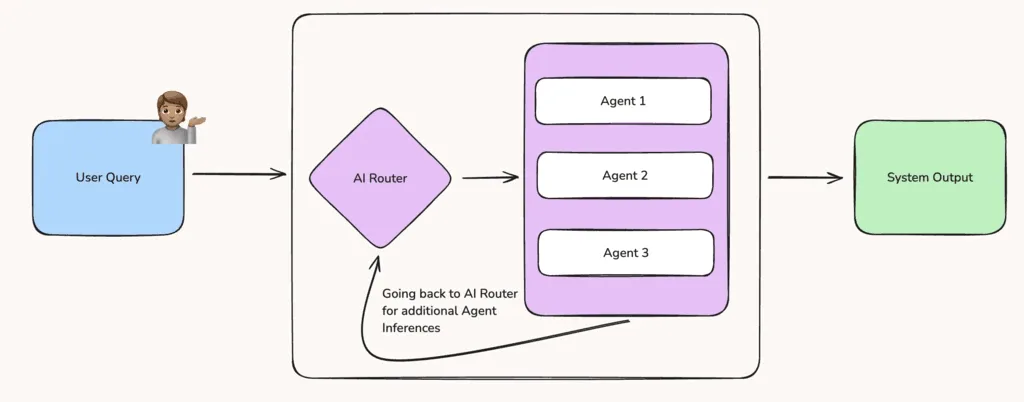
Furthermore, agent routing differs from AI agent orchestration and load balancing.
Orchestration coordinates how multiple agents work together, share state, and complete a broader workflow. And load balancing distributes requests across equivalent system resources based on factors such as capacity, availability, or latency.
Here is the comparison table:
| Concept | Primary purpose | Decision basis | Example | When it is used |
| AI agent routing | Select the right agent, model, tool, or workflow | Intent, semantics, context, capability, policy, or confidence | Send an invoice question to a billing agent | When different requests require different specialists |
| Agent orchestration | Coordinate the completion of a larger workflow | Dependencies, state, execution order, intermediate outputs, and policies | Ask a research agent to gather sources, then send findings to a writing agent | When several agents must cooperate |
| Load balancing | Distribute requests across equivalent infrastructure | Capacity, health, latency, geography, or utilization | Send a model request to the least busy inference server | When multiple replicas provide the same service |
How does an AI agent router work?
An AI agent router starts by analyzing the incoming query and its surrounding context. The AI routing system may consider the conversation history, user profile, session data, available tools, and results from earlier steps.
This context is passed to the intent and feature extraction phase. It uses keyword rules, vector embedding similarity, an intent classifier, or an LLM prompt to understand what the user needs.
Once these features are extracted, the AI agent routing system then scores the available agents based on how well their capabilities match the request. Based on these scores, the router makes a routing decision. It sends the query to one specialist through a hard route or forwards it to several agents in parallel when the task requires multiple areas of expertise.
The system then passes the relevant conversation context and permissions to the selected agent. If the router confidence is low in its decision, it sends the request to a default assistant or asks the user for clarification
Finally, the system logs the routing decision, confidence score, selected agent, response time, and final result. This feedback lets teams detect routing drift and improve the agent router over time.
What are the key AI agent routing patterns?
AI agent routing patterns differ in how they interpret requests and choose destinations. Rules provide speed and control. Embeddings handle semantic similarity. LLMs handle nuanced language. Fine-tuned classifiers provide predictable low-latency inference. Hybrid systems combine these methods.
Here is the table summarizing the difference between different AI agent routing patterns:
| Routing pattern | Mechanism | Best use case | Main trade-off |
| Rule-based | Keywords, regex, metadata, or explicit conditions | Stable, high-precision business rules | Fast and cheap, but brittle |
| Semantic routing | Embedding similarity between input and route examples | Large intent sets with varied phrasing | Low inference cost, but sensitive to examples and thresholds |
| LLM-based routing | Prompted model returns a route label or structured decision | Nuanced or ambiguous requests | Flexible, but adds latency and token cost |
| Fine-tuned classifier | Trained classification model predicts a route | High-volume systems with labeled data | Fast at scale, but requires training and maintenance |
| Hybrid routing | Combines rules, embeddings, classifiers, and LLM fallback | Production systems balancing quality and cost | More reliable, but more complex to operate |
| Hierarchical routing | Routes through multiple levels of specialization | Large agent catalogs | Scales better, but early mistakes can cascade |
| Dynamic routing | Chooses each next step from runtime state | Open-ended multi-agent workflows | Adaptive, but harder to test |
AI agent routing vs. related concepts
AI routing overlaps with orchestration and intent routing, but each concept answers a different architectural question. Understanding these differences helps teams avoid placing too many responsibilities inside a single routing component.
AI agent routing vs. AI agent orchestration
Both processes manage different parts of the multi-agent life cycle.
AI agent routing determines where an incoming request should go. The agent router analyzes the user’s intent, context, and task requirements before selecting the most suitable agent, model, or tool.
In contrast, AI agent orchestration manages how agents complete the broader workflow after the routing decision. It coordinates task order, shared state, memory, parallel execution, error recovery, and the combination of intermediate outputs into one final response.
Simply put, AI routing decides who should handle the task, while orchestration manages how the work gets completed.
AI agent router vs. multi-agent orchestrator systems
An AI agent router is a focused component that classifies an input and directs it to the most appropriate agent.
A multi-agent orchestrator is the larger runtime that manages the entire workflow. It provides shared state, memory, database connections, access to tools, checkpoints, retries, and prompt management.
The orchestrator also executes the selected workflow and coordinates the agents after the agent router makes its decision.
So, the router handles task selection, while the orchestrator provides the infrastructure needed to run and manage the multi-agent system.
Intent router vs. AI agent router
An intent router maps a user statement to a predefined intent, such as reset_password, track_order, or request_refund. The system then runs a fixed workflow or code block associated with that intent.
But an AI agent router transfers the request to an autonomous agent that may use its own language model, instructions, memory, and tools to decide how to complete the task.
For example, an intent router may identify a request as a billing issue and trigger a fixed billing workflow. AI agent routing may instead route the request to a billing agent who can review account data, ask follow-up questions, and select the appropriate payment tool.
Building an AI agent routing using LangGraph
To give you a taste of how AI agent routing works, let’s look at three core AI agent routing patterns implemented using the LangGraph framework.
We will use a scenario with a knowledge assistant and 4 specialist agents (Code, Math, Creative Writing, and General Knowledge).
Run the following script to install the LangGraph, LangChain, and Groq libraries. You can run this code in Google Colab, so you don’t need to install any additional libraries.
!pip install -qU langgraph langchain-groq langchain-coreWe use Groq’s free API to access Llama 3.3 70B (a powerful open-source model) to route user queries to specialized agents.
Get your free API key at console.groq.com
import os
from getpass import getpass

if not os.environ.get("GROQ_API_KEY"):
    os.environ["GROQ_API_KEY"] = getpass("🔑 Enter your Groq API key: ")

print("✅ API key configured.")The following script imports the required libraries into your Python application. And initialize the language model.
from typing import Annotated, List
from typing_extensions import TypedDict, Literal
import operator

from pydantic import BaseModel, Field
from langchain_groq import ChatGroq
from langchain_core.messages import HumanMessage, SystemMessage

from langgraph.graph import StateGraph, START, END

# ── Initialize the LLM ───────────────────────────────────────────────
llm = ChatGroq(
    model="llama-3.3-70b-versatile",
    temperature=0,
    max_tokens=1024,
)Single-agent routing example
In the simplest routing pattern, a router agent classifies the user’s input and dispatches it to exactly one specialist agent.
In LangGraph, you specify a graph state to share information between nodes. The following code defines the graph state and the Pydantic schema. The state stores the user query, the category selected by the router, and the final response. The Category class ensures the LLM specifically returns one of four predefined expert categories.
class SingleRouterState(TypedDict):
    query: str        # user input
    category: str     # router's classification
    response: str     # final agent response

class Category(BaseModel):
    """The classification category for a user query."""
    category: Literal["CODE_EXPERT", "MATH_EXPERT", "WRITING_EXPERT", "GENERAL_EXPERT"] = Field(
        description="The category of the query"
)Now we will define the routing agent and the specialist agents. The llm.with_structured_output(Category) function forces the router to return one of our allowed categories based on the system prompt. We also define a route_to_expert function that will act as our conditional edge, alongside the four actual expert agents that generate the final responses.
def router(state: SingleRouterState):
    """Classify the user query into one of the predefined categories."""

    system_prompt = """
    You are a classifier that analyzes user queries and assigns them to one of the following categories:

    - CODE_EXPERT: The query is about programming, debugging, software engineering, APIs, or algorithms.
    - MATH_EXPERT: The query is about mathematics, statistics, equations, calculations, or logic puzzles.
    - WRITING_EXPERT: The query is about creative writing, essays, stories, poetry, or copywriting.
    - GENERAL_EXPERT: Anything else that does not fit into the above three categories.

    Return only one of the above category names.
    """

    structured_llm = llm.with_structured_output(Category)

    result = structured_llm.invoke([
        SystemMessage(content=system_prompt),
        HumanMessage(content=state["query"]),
    ])

    print(f"   🏷️  Router classified as: {result.category}")
    return {"category": result.category}


# ── Conditional edge function ────────────────────────────────────────

def route_to_expert(state: SingleRouterState):
    """Return the category string — LangGraph uses this to pick the next node."""
    return state["category"]


# ── Specialist Agent Nodes ───────────────────────────────────────────

def code_expert(state: SingleRouterState):
    """Handle programming & software engineering queries."""
    response = llm.invoke([
        SystemMessage(content="You are an expert software engineer. Provide clear, well-commented code with explanations. Always include best practices and edge cases."),
        HumanMessage(content=state["query"]),
    ])
    return {"response": response.content}


def math_expert(state: SingleRouterState):
    """Handle mathematics & logic queries."""
    response = llm.invoke([
        SystemMessage(content="You are a mathematics professor. Solve problems step-by-step, showing all work clearly. Use LaTeX notation for formulas where appropriate."),
        HumanMessage(content=state["query"]),
    ])
    return {"response": response.content}


def writing_expert(state: SingleRouterState):
    """Handle creative writing queries."""
    response = llm.invoke([
        SystemMessage(content="You are a creative writing expert and storyteller. Craft engaging, vivid, and well-structured prose. Pay attention to tone, rhythm, and narrative flow."),
        HumanMessage(content=state["query"]),
    ])
    return {"response": response.content}


def general_expert(state: SingleRouterState):
    """Handle general knowledge queries."""
    response = llm.invoke([
        SystemMessage(content="You are a helpful AI assistant with broad general knowledge. Provide accurate, well-organized answers."),
        HumanMessage(content=state["query"]),
    ])
return {"response": response.content}The final block for this pattern adds the nodes to the graph, sets the entry point, and defines the conditional edges based on the route_to_expert output. This connects everything together.
graph_builder = StateGraph(SingleRouterState)

graph_builder.add_node("router", router)
graph_builder.add_node("code_expert", code_expert)
graph_builder.add_node("math_expert", math_expert)
graph_builder.add_node("writing_expert", writing_expert)
graph_builder.add_node("general_expert", general_expert)

graph_builder.set_entry_point("router")

graph_builder.add_conditional_edges(
    "router",
    route_to_expert,
    {
        "CODE_EXPERT": "code_expert",
        "MATH_EXPERT": "math_expert",
        "WRITING_EXPERT": "writing_expert",
        "GENERAL_EXPERT": "general_expert",
    }
)

graph_builder.add_edge("code_expert", END)
graph_builder.add_edge("math_expert", END)
graph_builder.add_edge("writing_expert", END)
graph_builder.add_edge("general_expert", END)

single_agent_graph = graph_builder.compile()You can visualize the graph using the following script.
from IPython.display import Image, display

try:
    display(Image(single_agent_graph.get_graph().draw_mermaid_png()))
except Exception as e:
    pass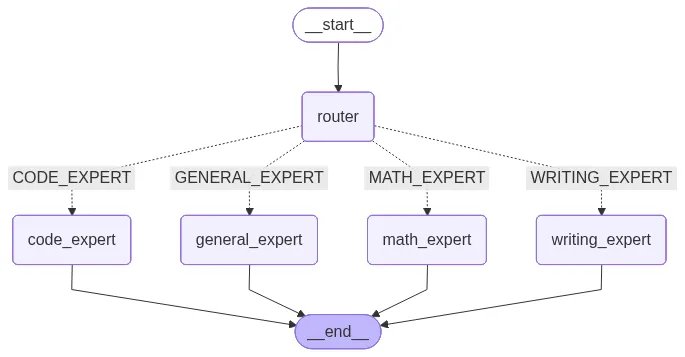
Finally, you can invoke the graph using the following script.
result = single_agent_graph.invoke({"query": "What is the derivative of x² + 3x?"})
print(result['response'])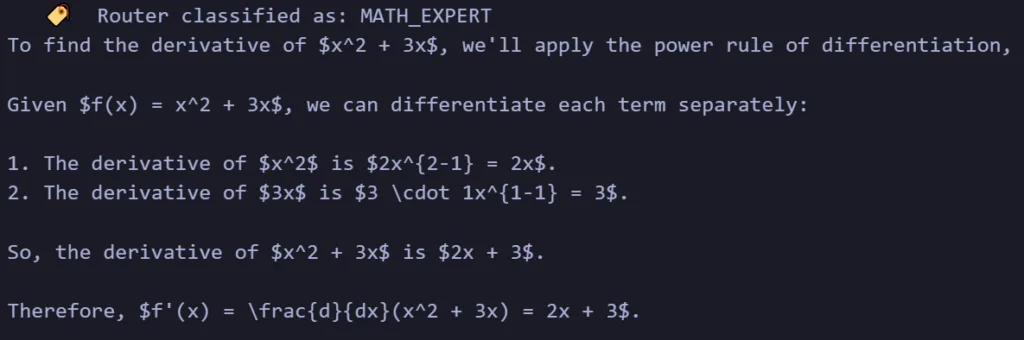
Multi-agent parallel routing
When a query spans multiple domains (e.g., writing code to solve a math equation), a multi-agent router can dispatch the query to multiple agents in parallel.
Notice how the model state below now contains a list of categories instead of a single string, and uses Annotated[list, operator.add] to merge responses from parallel agents.
class MultiRouterState(TypedDict):
    query: str
    categories: List[str]                         # list of selected categories
    response: Annotated[list, operator.add]        # merge responses from parallel agents


class MultiCategory(BaseModel):
    """All applicable categories for a user query."""
    categories: List[
        Literal["CODE_EXPERT", "MATH_EXPERT", "WRITING_EXPERT", "GENERAL_EXPERT"]
    ] = Field(
        description="All applicable categories. Return multiple if the query spans multiple domains."
)The routing logic is similar, but the prompt instructs the LLM to return all applicable categories. The specialist agents now return lists, which allows LangGraph to combine their outputs.
# ── Multi-agent router ───────────────────────────────────────────────

def multi_router(state: MultiRouterState):
    """Classify the query into ALL applicable categories."""

    system_prompt = """
    You are a classifier that analyzes user queries and assigns ALL applicable categories:

    - CODE_EXPERT: programming, debugging, software engineering, APIs, algorithms
    - MATH_EXPERT: mathematics, statistics, equations, calculations, logic puzzles
    - WRITING_EXPERT: creative writing, essays, stories, poetry, copywriting
    - GENERAL_EXPERT: anything else (history, science, trivia, etc.)

    Return ALL relevant categories. If the query involves multiple domains, return multiple.
    For example, "write code to solve a math equation" should return both CODE_EXPERT and MATH_EXPERT.
    """

    structured_llm = llm.with_structured_output(MultiCategory)

    result = structured_llm.invoke([
        SystemMessage(content=system_prompt),
        HumanMessage(content=state["query"]),
    ])

    print(f"   🏷️  Router classified as: {result.categories}")
    return {"categories": result.categories}


def multi_route_to_expert(state: MultiRouterState) -> list[str]:
    """Return the list of categories — LangGraph dispatches to ALL of them in parallel."""
    return state["categories"]


# ── Specialist agents (return lists for operator.add merging) ───────

def multi_code_expert(state: MultiRouterState):
    response = llm.invoke([
        SystemMessage(content="You are an expert software engineer. Provide clear code with explanations. Be concise."),
        HumanMessage(content=state["query"]),
    ])
    return {"response": [f"💻 [CODE EXPERT]\n{response.content}"]}


def multi_math_expert(state: MultiRouterState):
    response = llm.invoke([
        SystemMessage(content="You are a mathematics professor. Solve step-by-step. Be concise."),
        HumanMessage(content=state["query"]),
    ])
    return {"response": [f"📐 [MATH EXPERT]\n{response.content}"]}


def multi_writing_expert(state: MultiRouterState):
    response = llm.invoke([
        SystemMessage(content="You are a creative writing expert. Craft engaging prose. Be concise."),
        HumanMessage(content=state["query"]),
    ])
    return {"response": [f"✍️ [WRITING EXPERT]\n{response.content}"]}


def multi_general_expert(state: MultiRouterState):
    response = llm.invoke([
        SystemMessage(content="You are a helpful assistant with broad knowledge. Be concise."),
        HumanMessage(content=state["query"]),
    ])
return {"response": [f"🌐 [GENERAL EXPERT]\n{response.content}"]}When building the graph, the conditional edge simply takes the list of strings returned by multi_route_to_expert. LangGraph handles spinning up the corresponding nodes in parallel automatically.
multi_builder = StateGraph(MultiRouterState)

multi_builder.add_node("router", multi_router)
multi_builder.add_node("CODE_EXPERT", multi_code_expert)
multi_builder.add_node("MATH_EXPERT", multi_math_expert)
multi_builder.add_node("WRITING_EXPERT", multi_writing_expert)
multi_builder.add_node("GENERAL_EXPERT", multi_general_expert)

multi_builder.set_entry_point("router")

multi_builder.add_conditional_edges(
    "router",
    multi_route_to_expert,
    ["CODE_EXPERT", "MATH_EXPERT", "WRITING_EXPERT", "GENERAL_EXPERT"]
)

multi_builder.add_edge("CODE_EXPERT", END)
multi_builder.add_edge("MATH_EXPERT", END)
multi_builder.add_edge("WRITING_EXPERT", END)
multi_builder.add_edge("GENERAL_EXPERT", END)

multi_agent_graph = multi_builder.compile()You can visualize the graph using the following script.
try:
    display(Image(multi_agent_graph.get_graph().draw_mermaid_png()))
except Exception:
    pass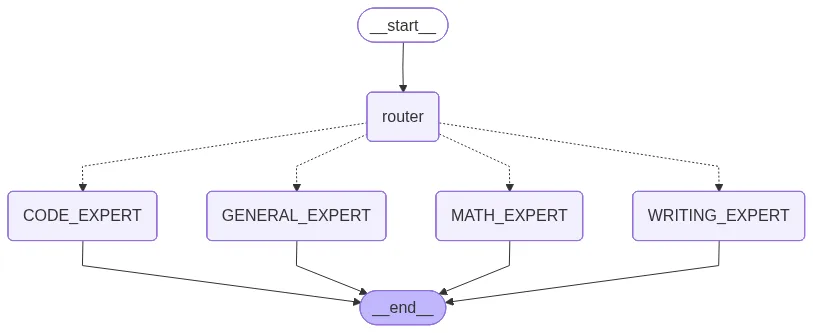
Finally, you can invoke the graph using the following script.
result = multi_agent_graph.invoke({
    "query": "Write a Python function that computes the definite integral of a polynomial using the trapezoidal rule, and explain the math behind it."
})

print(f"\n📂 Categories: {result['categories']}")
print(f"📊 Agents activated: {len(result['response'])}")
print(f"{'─'*60}")
for r in result["response"]:
    print(f"\n{r[:500]}\n")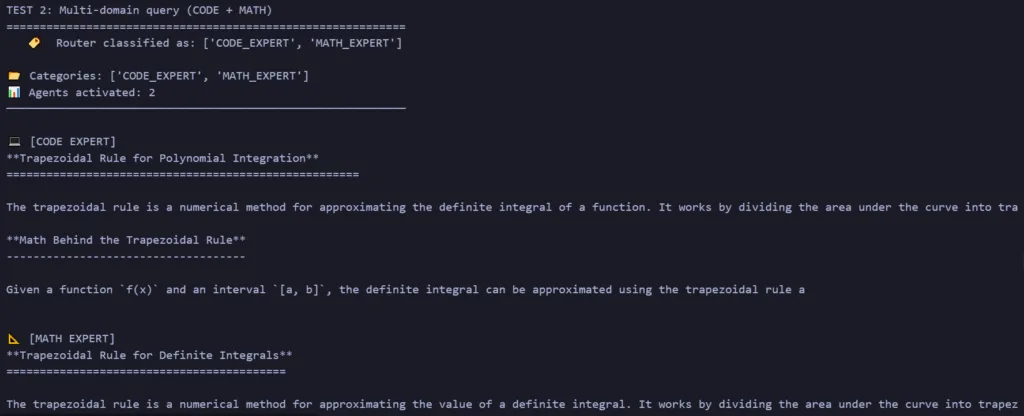
Hierarchical routing
For complex setups, you can add multiple levels of routing. In this hierarchical example, the top-level (L1) router dispatches to general domains. If the query lands in the Coding domain, a secondary (L2) router steps in to determine if it’s a frontend or backend question.
We expand the state and schemas to handle two tiers of routing outputs:
class HierarchicalState(TypedDict):
    query: str
    category: str        # L1 router classification
    code_subtype: str    # L2 router classification (only for code queries)
    response: str        # final response


class L1Category(BaseModel):
    """Level-1 routing category."""
    category: Literal["CODE_EXPERT", "MATH_EXPERT", "WRITING_EXPERT", "GENERAL_EXPERT"] = Field(
        description="The top-level category of the query"
    )


class CodeSubtype(BaseModel):
    """Level-2 routing: sub-classification for code queries."""
    code_subtype: Literal["FRONTEND", "BACKEND"] = Field(
        description="Whether the coding question is about frontend (HTML, CSS, JS, React) or backend (APIs, databases, server logic, Python, Java)"
)Next, we define the L1 router (general domains) and the L2 router (frontend vs. backend). Instead of a final response, the L2 sub-router updates the code_subtype attribute in the state.
# ── Level-1 Router ───────────────────────────────────────────────────
def l1_router(state: HierarchicalState):
    """Top-level router: classify into CODE, MATH, WRITING, or GENERAL."""
    system_prompt = """
    You are a classifier. Assign the user query to one of:
    - CODE_EXPERT: programming, debugging, software engineering, APIs, algorithms
    - MATH_EXPERT: mathematics, statistics, equations, calculations
    - WRITING_EXPERT: creative writing, essays, stories, poetry
    - GENERAL_EXPERT: anything else
    """

    result = llm.with_structured_output(L1Category).invoke([
        SystemMessage(content=system_prompt),
        HumanMessage(content=state["query"]),
    ])

    print(f"   🏷️  L1 Router → {result.category}")
    return {"category": result.category}

def l1_route(state: HierarchicalState):
    return state["category"]

# ── Level-2 Router (Code Sub-Router) ─────────────────────────────────

def code_sub_router(state: HierarchicalState):
    """Sub-router: is this a frontend or backend coding question?"""
    system_prompt = """
    You are a classifier for programming questions. Determine whether the query is about:
    - FRONTEND: HTML, CSS, JavaScript, React, Vue, Angular, UI/UX, browser APIs, responsive design
    - BACKEND: APIs, databases, server-side logic, Python, Java, Go, system design, DevOps, CLI tools
    """

    result = llm.with_structured_output(CodeSubtype).invoke([
        SystemMessage(content=system_prompt),
        HumanMessage(content=state["query"]),
    ])

    print(f"   🏷️  L2 Router → {result.code_subtype}")
    return {"code_subtype": result.code_subtype}


def l2_route(state: HierarchicalState):
    return state["code_subtype"]

# ── Leaf Agent Nodes ─────────────────────────────────────────────────

def frontend_agent(state: HierarchicalState):
    response = llm.invoke([
        SystemMessage(content="You are a frontend web development expert specializing in HTML, CSS, JavaScript, React, and modern UI frameworks. Provide clean, accessible code with best practices."),
        HumanMessage(content=state["query"]),
    ])
    return {"response": response.content}


def backend_agent(state: HierarchicalState):
    response = llm.invoke([
        SystemMessage(content="You are a backend engineering expert specializing in APIs, databases, server architecture, Python, and system design. Provide production-ready code with best practices."),
        HumanMessage(content=state["query"]),
    ])
    return {"response": response.content}


def hier_math_expert(state: HierarchicalState):
    response = llm.invoke([
        SystemMessage(content="You are a mathematics professor. Solve step-by-step. Be concise."),
        HumanMessage(content=state["query"]),
    ])
    return {"response": response.content}


def hier_writing_expert(state: HierarchicalState):
    response = llm.invoke([
        SystemMessage(content="You are a creative writing expert. Craft engaging prose. Be concise."),
        HumanMessage(content=state["query"]),
    ])
    return {"response": response.content}


def hier_general_expert(state: HierarchicalState):
    response = llm.invoke([
        SystemMessage(content="You are a helpful assistant with broad knowledge. Be concise."),
        HumanMessage(content=state["query"]),
    ])
return {"response": response.content}Finally, we link it all up. Notice the double conditional edges: the L1 edge can route straight to a final expert (like Math) OR into the code_sub_router. If it hits the sub-router, a second conditional edge takes over to decide between the frontend and backend agents.
hier_builder = StateGraph(HierarchicalState)

# Add all nodes
hier_builder.add_node("l1_router", l1_router)
hier_builder.add_node("code_sub_router", code_sub_router)
hier_builder.add_node("frontend_agent", frontend_agent)
hier_builder.add_node("backend_agent", backend_agent)
hier_builder.add_node("math_expert", hier_math_expert)
hier_builder.add_node("writing_expert", hier_writing_expert)
hier_builder.add_node("general_expert", hier_general_expert)

# Entry point
hier_builder.set_entry_point("l1_router")

# L1 conditional edges
hier_builder.add_conditional_edges(
    "l1_router",
    l1_route,
    {
        "CODE_EXPERT": "code_sub_router",   # → goes to L2 sub-router!
        "MATH_EXPERT": "math_expert",
        "WRITING_EXPERT": "writing_expert",
        "GENERAL_EXPERT": "general_expert",
    }
)

# L2 conditional edges (within code domain)
hier_builder.add_conditional_edges(
    "code_sub_router",
    l2_route,
    {
        "FRONTEND": "frontend_agent",
        "BACKEND": "backend_agent",
    }
)

# All leaf nodes → END
hier_builder.add_edge("frontend_agent", END)
hier_builder.add_edge("backend_agent", END)
hier_builder.add_edge("math_expert", END)
hier_builder.add_edge("writing_expert", END)
hier_builder.add_edge("general_expert", END)

hierarchical_graph = hier_builder.compile()try:
display(Image(hierarchical_graph.get_graph().draw_mermaid_png()))
except Exception:
passThe above script returns the following output.
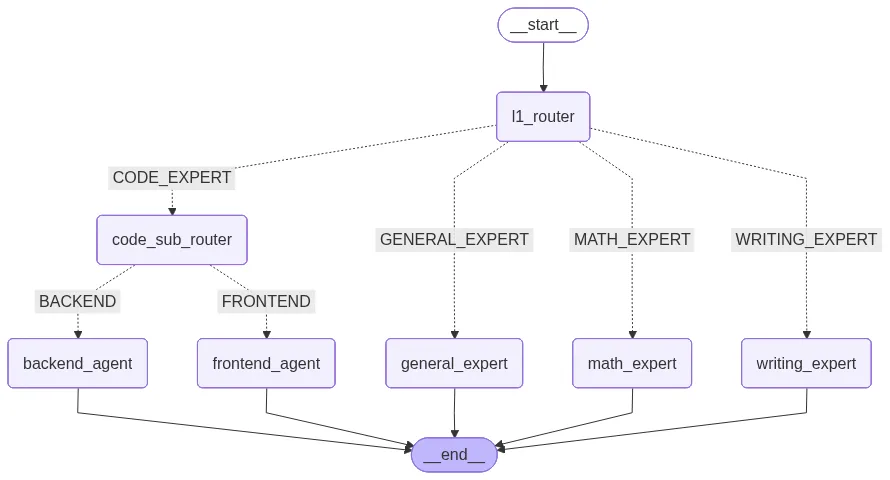
You can invoke the hierarchical routing graph using the following script.
# ── Test 1: Frontend question (L1→CODE→L2→FRONTEND) ────────────────
result = hierarchical_graph.invoke({
    "query": "How do I create a responsive navbar with a hamburger menu using React and CSS?"
})
print(f"\n📂 L1 Category: {result['category']}")
print(f"📂 L2 Code Subtype: {result['code_subtype']}")
print(f"💬 Response:\n{result['response'][:500]}")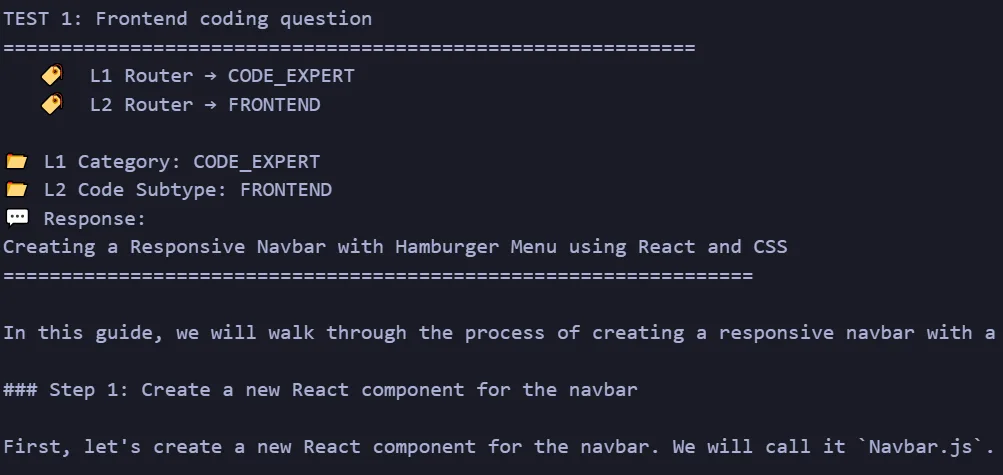
# ── Test 2: Backend question (L1→CODE→L2→BACKEND) ──────────────────
result = hierarchical_graph.invoke({
    "query": "Write a FastAPI endpoint that connects to PostgreSQL and returns paginated user data."
})
print(f"\n📂 L1 Category: {result['category']}")
print(f"📂 L2 Code Subtype: {result['code_subtype']}")
print(f"💬 Response:\n{result['response'][:500]}")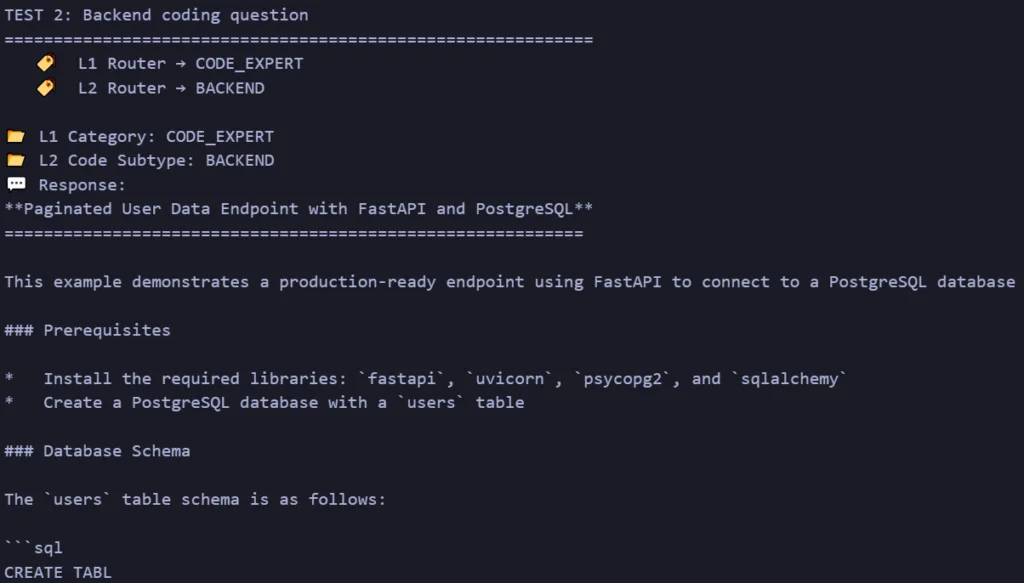
# ── Test 3: Math query (L1→MATH, bypasses L2 entirely) ─────────────
result = hierarchical_graph.invoke({
    "query": "Prove that the square root of 2 is irrational."
})
print(f"\n📂 L1 Category: {result['category']}")
print(f"📂 L2 Code Subtype: {result.get('code_subtype', 'N/A (skipped)')}")
print(f"💬 Response:\n{result['response'][:500]}")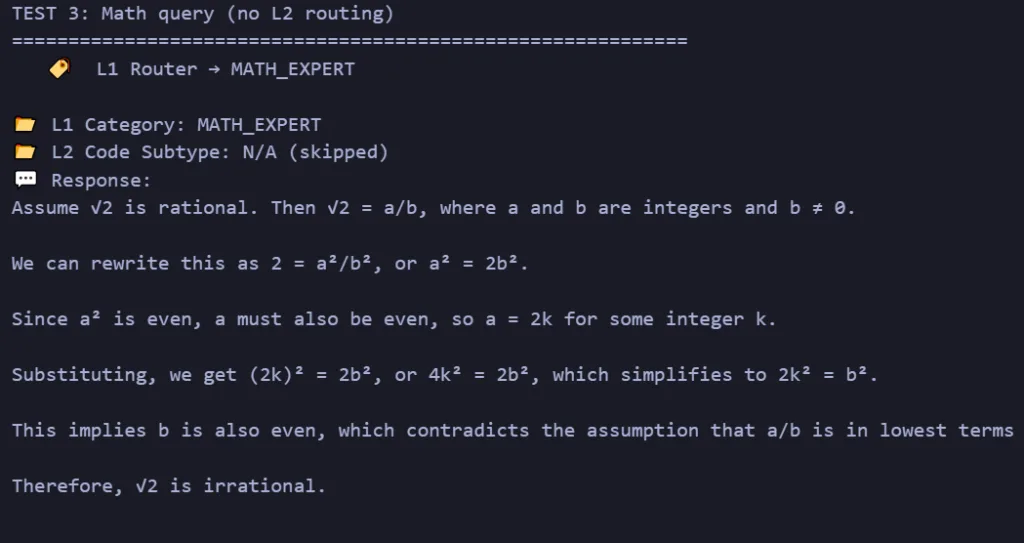
Evaluating and debugging AI agent routing
Failures in AI agent routing are silent. The system still processes the request, but the agent router sends it to the wrong or less suitable agent. Teams can detect these problems by tracking routing metrics, using LLM-based evaluators, and reviewing the complete path the system follows before producing an answer.
Metrics to track AI agent routing
AI agent routing metrics help explain whether the agent router selects the correct destination, handles uncertainty safely, and improves the final task outcome.
- Routing accuracy: Measures the percentage of requests the agent router sends to the correct destination. It provides a view of AI agent routing performance but should be combined with route metrics. Recent research, The Routing Plateau, shows that different LLM routers can achieve similar accuracy levels while remaining far below that of an ideal per-query router.
- Per-route precision: It measures how many requests assigned to a specific agent actually belong there. Low precision means the agent is receiving too many incorrect requests.
- Per-route recall: Measures how many requests that should reach an agent are correctly identified. Low recall indicates that valid requests are being routed elsewhere.
- Confidence calibration: Measures whether the router’s confidence scores match its actual accuracy. Poor calibration can cause the system to make overconfident routing decisions.
- Fallback rate: Measures how often the AI routing system asks for clarification, uses a default agent, or escalates to a human. A consistently high rate may indicate unclear routing logic or overlapping agent responsibilities.
- Route distribution: Tracks how traffic is distributed across different agents over time. Unexpected changes can reveal router drift or changes in user behavior.
- Latency per route: Evaluate the time the routing decision adds before an agent starts processing the request. Monitoring this metric helps optimize real-time applications such as chatbots and voice assistants.
- Cost per route: Measures the total inference cost of selecting and executing a route. Comparing costs across routing strategies helps balance performance and operational expenses.
- Task success rate: Assesses whether the selected agent completes the user’s objective. Toby Ord’s paper, Is There a Half-Life for the Success Rates of AI Agents?, shows that agent success can decline sharply as tasks become longer and involve more failure-prone subtasks. This makes end-to-end task completion more meaningful than routing accuracy alone.
LLM-as-a-Judge and trajectory evaluation
Teams uses LLM-as-a-judge to assess the quality of AI routing decisions. These evaluator models follow a rubric to score whether the selected agent matches the user’s intent, context, and task requirements.
A detailed scoring scale, such as 0 to 5, can provide more useful feedback than a simple pass-or-fail result. It allows evaluators to distinguish between a fully correct route, a partly suitable route, and a clear misrouting error.
But reviewing only the final response is not enough for complex multi-agent workflows. Teams also use trajectory evaluation to inspect the complete sequence of routing decisions, agent actions, and tool calls.
from agentevals.trajectory.match import create_trajectory_match_evaluator

evaluator = create_trajectory_match_evaluator(
    trajectory_match_mode="strict",
)
Furthermore, the paper Human-on-the-Bridge: Scalable Evaluation for AI Agents by Fouad Bousetouane reinforces the need for trajectory-level evaluation. Across 23,500 agent turns, the study identified failures that final-output checks and single-evaluator scoring can miss. These include incorrect or missing tool calls, policy drift, unsafe execution paths, and responses that appear safe but do not resolve the task.
Tracing frameworks and failure monitoring
Teams use observability and tracing platforms to monitor AI agent routing decisions. These tools record the input, candidate routes, selected agent, confidence score, tool calls, latency, and final result.
For example, Patronus AI supports model evaluation, test generation, and production monitoring. Teams can connect evaluation checks to development and deployment pipelines to detect routing failures before releasing changes.
The Patronus Lynx evaluator detects hallucinations by comparing generated answers with the retrieved source material. Although Lynx does not measure routing accuracy, teams can use it to identify downstream errors caused by an incorrect route, such as sending a grounded question to an agent that lacks access to the required evidence.
Other tools, including Langfuse, Arize Phoenix, and LangSmith, record traces and execution spans across the workflow. These traces help teams understand why the agent router selected a destination, which tools the chosen agent used, and where the workflow started to fail.
Which frameworks and tools support AI agent routing?
The best framework depends on the routing model you need. LangGraph fits explicit stateful graphs. The OpenAI Agents SDK provides agent handoffs. AutoGen focuses on multi-agent conversations and teams. CrewAI supports crews and event-driven flows. Semantic Router fits lightweight embedding-based classification.
The comparison table below outlines the properties of these frameworks, detailing the primary approaches and targeted use cases:
| Framework or tool | Routing approach | Best fit | Learning curve |
| LangChain and LangGraph | Conditional graph edges, commands, shared state, and runtime transitions. | Stateful production workflows with explicit control. | Medium to high |
| OpenAI Agents SDK | Agent handoffs and tool-based delegation. | Applications built around OpenAI-compatible agent primitives. | Medium |
| Microsoft AutoGen | Multi-agent teams and conversational selection patterns. | Research, enterprise prototypes, and collaborative agents. | Medium to high |
| CrewAI | Role-based crews and event-driven flows. | Business workflows and rapid multi-agent development. | Medium |
| Semantic Router | Embedding similarity and route thresholds. | Fast intent routing without a generative call. | Low to medium |
| Low-Code Platforms (Flowise or Langflow) | Visual drag-and-drop workflow configuration. | Prototyping, MVP generation, and codeless pipeline design. | Low initially, higher for production customization |
Real-world applications of AI agent routing
AI agent routing appears wherever inputs vary enough to require different capabilities. It is commonly used in messaging platforms, customer support, call centers, coding assistants, enterprise search, and sales systems.
Conversational AI and messaging platforms
Businesses use AI-powered conversation routing platforms to manage large volumes of WhatsApp messages. The agent router analyzes the message, customer history, language, phone number, and account details before selecting the most suitable agent.
For example, delivery questions go to an order-tracking agent, refund requests to a returns agent, and complex complaints to a human support team. The system should pass the conversation history to the selected agent so the user does not need to repeat information.
Customer support and ticket triage
An AI agent can handle ticket triage by analyzing the issue, urgency, product, customer type, and required expertise. It then sends the ticket to the correct specialist agent or human queue.
For example, Intercom uses an advanced routing layer for its customer service agent, Fin Voice. When a customer submits a support request via chat or email, the router analyzes the issue.
If it detects a simple query, it routes the user to a specialized sub-workflow or an external CRM system. If the request is emotionally charged, the agent triggers a routing decision to hand off the conversation to a human customer support specialist, passing along the full interaction log.
Voice AI and call centers
Voice AI systems use speech recognition to convert a caller’s words into text and identify the purpose of the call. The agent router then sends the caller to the right voice agent, workflow, or human representative.
Multi-agent coding assistants
Multi-agent coding systems use AI agent routing to divide software tasks among specialized coding agents. A router analyzes the developer’s request and sends different parts of the work to agents responsible for code generation, debugging, testing, documentation, or security review.
Enterprise knowledge assistants
Enterprise knowledge assistants use an agent router to send employee questions to the correct departmental knowledge source. A question about leave policy may go to an HR agent, while a contract question goes to a legal agent.
This selective routing reduces irrelevant retrieval results and limits each agent to the data it is allowed to access. It also lowers retrieval and inference costs by searching only the most relevant knowledge base.
E-commerce and lead assignment
Sales and e-commerce systems use AI agents for real-time task routing and lead assignment. The router evaluates signals such as company size, location, product interest, shopping behavior, and conversation history before selecting the next action.
High-value prospects go to a sales representative, while routine product questions go to an automated agent. It helps teams respond faster and match each lead with the most suitable sales workflow.
Best practices for production AI agent routing
Production AI agent routing requires clear fallback paths, reliable monitoring, and regular testing. These practices help teams maintain routing accuracy as traffic patterns, user behavior, and agent capabilities change.
- Deploy hybrid routing pipelines: Do not rely on one routing method. Start with fast, low-cost rule-based checks for clear requests. Then use semantic embedding similarity for requests that require more flexible intent matching. Reserve a generative LLM for ambiguous or low-confidence queries that earlier stages cannot classify reliably.
- Establish confidence thresholds: Set a minimum confidence or similarity score for each agent router. If no route meets the threshold, the system should ask for clarification or send to a default agent. The router should not force low-confidence decisions.
- Keep agent responsibilities narrow: Give each agent a clear and limited responsibility. When several agents have overlapping prompts or capabilities, the AI routing layer struggles to select the correct destination. Narrow responsibilities reduce ambiguity and make agents easier to test and update.
- Implement comprehensive tracing: Log every routing decision, including the user input, candidate routes, selected agent, confidence score, routing latency, fallback action, and execution result. These traces help teams identify incorrect routes, unexpected traffic patterns, and slow execution paths.
- Benchmark against a labeled test dataset: Test the agent router against a manually reviewed dataset before deploying routing changes. Include common requests, ambiguous inputs, multi-intent queries, low-confidence examples, and cases that should trigger human escalation. Run regression tests whenever you update prompts, embedding models, route definitions, or agent capabilities.
- Monitor routing distribution over time: Track how often the system selects each route. Sudden changes indicate router drift, overlapping agent responsibilities, new user behavior, or a broken routing rule.
- Keep routing logic separate from agent logic: Let the router decide where a request should go, and let the selected agent decide how to complete it. This separation makes AI agent routing easier to maintain without changing the internal logic of every agent.
Conclusion
AI agent routing brings decision-making in multi-agent systems to determine whether each request reaches the right model, tool, specialist, or human workflow. Start with a small route taxonomy and a labeled test set. Add a deterministic baseline, evaluate semantic or LLM-based routing where language requires more flexibility, and introduce hybrid fallbacks before scaling. Continue measuring route quality after deployment because agents, tools, and user behavior will change.
Frequently Asked Questions
How does AI agent routing improve customer interactions?
AI agent routing improves customer interactions by sending each request to the agent best suited to resolve it, reducing response times and increasing answer accuracy.
How do you choose an AI agent routing solution?
Choose an AI agent routing solution based on your routing strategy, scalability, supported tools, observability, security, integration options, and human-in-the-loop capabilities.
What features should an AI agent routing platform include?
A good platform should provide intent classification, agent selection, tool orchestration, memory management, fallback handling, monitoring, and support for multi-agent workflows.
Can AI agent routing work with CRM and business systems?
Yes. Most enterprise AI routing frameworks integrate with CRM platforms, databases, APIs, ticketing systems, and business applications so agents can retrieve and update information automatically.
What is dynamic AI agent workload distribution?
Dynamic workload distribution continuously assigns tasks to available agents based on factors such as expertise, current load, cost, latency, and performance instead of using fixed routing rules.
What is the difference between AI agent routing and workflow orchestration?
AI agent routing decides which agent should handle a task, while workflow orchestration coordinates how multiple agents, tools, and processes work together to complete it.
Which industries benefit most from AI agent routing?
AI agent routing is widely used in customer support, healthcare, finance, cybersecurity, software engineering, e-commerce, logistics, and enterprise knowledge management.
Does AI agent routing require multiple AI models?
No. AI agent routing can work with a single model or multiple specialized models depending on the complexity of the application and the required expertise.
What is the difference between AI agent routing and AI model routing?
AI model routing selects the best language model for a request, whereas AI agent routing selects the best autonomous agent, which may use one or more models, tools, and workflows to complete a task.




Pingback: 10 Best AI Coding Agents in 2026 [Updated]